Click to WhatsApp Ads (CTWA): Complete 2026 Guide to Setup, Optimization & ROI Tracking

Table of Contents
Think about the last time you clicked on an ad on Instagram. Where did it take you? A landing page that loaded slowly, asked for your email, and then… crickets. You may have filled out the form. Maybe you bounced. Either way, the brand had no idea if you were serious or just vaguely curious.
Now imagine this instead: you see an ad for a product you actually want. You tap “Send WhatsApp Message.” Instantly, you’re chatting with the business. You ask a question. They answer in 30 seconds. You’re sold. Transaction done.
That’s the power of Click to WhatsApp Ads (CTWA)—and it’s exactly why Air France used click-to-WhatsApp ads to drive a 4.5x higher click-through rate, and Movistar Mexico saw a 3x increase in average monthly sales from customers reached via Meta apps.
If you’re still sending paid traffic to forms and landing pages in 2026, you’re leaving money on the table. This guide will show you everything: how to set up CTWA campaigns, what they actually cost, how to track real ROI (not just “conversations started”), and how to scale with automation.
What Are Click to WhatsApp Ads? (Definition + How They Actually Work)
Ads that Click to WhatsApp is a click-to-chat format that allows businesses to add a call-to-action button on their Facebook, Instagram, and TikTok ads that get customers directly engaging with them over WhatsApp. Instead of directing users to a website or form, these ads shorten the customer’s journey, taking them directly from an ad on social media to a WhatsApp conversation with your business by tapping a button, opening a thread with the business directly in the WhatsApp app.
The Simple User Experience: From Scroll to Chat in 3 Seconds
Here’s what happens from the user’s perspective:
- They see your ad while scrolling Instagram Stories, Facebook Feed, or Reels
- They tap the “Send Message” CTA with the WhatsApp icon
- WhatsApp opens instantly with your business number, often with a pre-filled message like “Hi! I saw your ad about the 20% discount.”
- They hit send and the conversation begins
No page load. No form fields. No “Thank you, we’ll get back to you.” Just an immediate, two-way conversation.
CTWA vs Traditional Lead Ads: What’s Really Different?
You might be thinking, “Don’t Facebook Lead Ads already capture leads?” Yes, but the experience and results are fundamentally different:
| Factor | Traditional Lead Ads | Click to WhatsApp Ads |
| User action | Fill out a form | Start a conversation |
| Friction | Medium to high | Extremely low |
| Lead quality | Often low (people forget they filled it) | High (active conversation = intent) |
| Follow-up | You email/call later (cold) | Instant, warm conversation |
| Data collected | Name, email, phone | Phone number + conversation context |
| User trust | Lower (giving data to stranger) | Higher (familiar WhatsApp environment) |
Users who click to start a chat show strong buying intent, making CTWA leads fundamentally warmer than form submissions.
Why Businesses Are Getting 3-5X Better Results with CTWA (Real Data)
The numbers speak for themselves. Let’s look at real performance data from brands that have run these campaigns.
Case Study: Air France’s 4.5X Higher CTR
Air France used click-to-WhatsApp ads to drive a 4.5x higher click-through rate for best offer newsletter messages, and 85% of their customer care conversations on social all took place on WhatsApp. By meeting customers where they already were—on WhatsApp, they eliminated the friction of app downloads or email sign-ups.
Key takeaway: When you reduce steps between interest and action, conversion rates skyrocket.
The 72-Hour Free Conversation Window (And Why It Matters for Your Budget)
Here’s a massive advantage most advertisers don’t fully understand: conversations are not charged when generated through an ad that clicks to WhatsApp. They are named “Free-Entry-Point Conversations” and hold a customer window that lasts for 72 hours.
What does this mean for you?
- You pay for the ad impression (like any Facebook/Instagram ad)
- But the WhatsApp conversation is FREE for 72 hours
- You can exchange unlimited messages during this window at no extra cost
Compare this to traditional ads, where you pay for the click, then separately for email marketing software, CRM costs, and call center expenses. With CTWA, businesses report reducing Cost Per Lead by 60% and getting 3-5X more leads.
What You Need Before Creating Your First CTWA Campaign
Before you jump into Meta Ads Manager, make sure you have these essentials in place. Missing even one will block your campaign.
The must-haves:
- A Facebook Business Page (not just a personal profile)
- WhatsApp Business Account (either the free app OR API access)
- Your WhatsApp number is connected to your Facebook Page (this is done in Page Settings → Linked Accounts)
- Meta Ads Manager access with payment method set up
Step-by-Step: How to Set Up Click to WhatsApp Ads in Meta Ads Manager
Now let’s get your first campaign live. I’ll walk you through exactly what to click, in order, with the reasoning behind each choice.
Step 1: Choosing the Right Campaign Objective (Engagement vs Sales vs Traffic)
Open Meta Ads Manager and click Create.
You’ll be asked to choose a campaign objective. For CTWA, your options are:
For CTWA campaigns, select an objective that aligns with the messaging (for example, Engagement, Leads, or Sales, depending on what is available in your account).
Here’s when to use each:
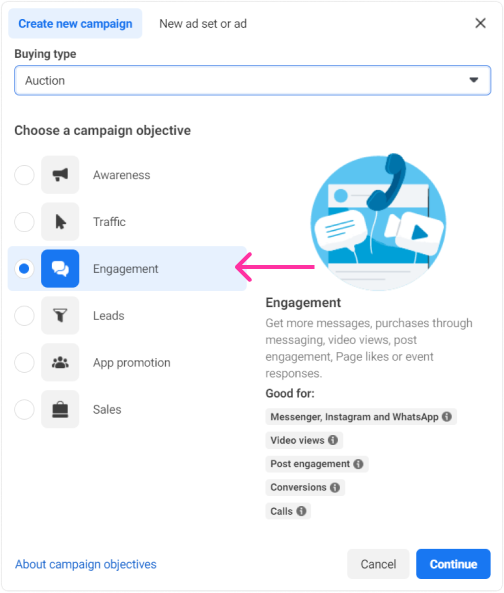
Engagement Objective (Most Recommended for Beginners)
- Meta optimizes for people most likely to start a conversation
- Best for lead generation, customer inquiries, and appointment bookings
- Gives you the most control over message templates
Sales Objective (For E-commerce with Tracking Setup)
- Optimizes for people likely to convert (not just chat)
- Requires Conversions API tracking to work well
- Best when you have conversion data flowing back to Meta
Traffic Objective (Least Recommended)
- Optimizes for clicks, not conversations
- You’ll get more clicks but fewer actual chats
- Only use if you’re testing reach
Typically, brands can only create Ads That Click to WhatsApp with the engagement, traffic, and sales objectives.
Pro tip: The Messages campaign objective will default your ad optimization to drive more conversations and therefore more opportunities to convert to a transaction.
Step 2: Configuring Messaging Apps at Ad Set Level
At the Ad Set level, scroll down to the Conversion section.
In the Conversion section, select Messaging Apps. Under Messaging Apps, choose WhatsApp.
Make sure to:
- Deselect Messenger and Instagram Direct (unless you want multi-channel messaging)
- Verify your connected WhatsApp number appears
- Set your budget (start with $10-20/day minimum)
- Set schedule (A campaign duration of seven or more days is recommended to achieve stable results. Meta recommends a weekly budget of at least ~$20)
Audience targeting:
Use broad targeting with a 2-10 million audience size. Sounds counterintuitive, right? But Meta’s algorithm in 2026 is incredibly good at finding the right people within a broad audience. Narrow targeting often limits the AI’s learning ability.
Start broad, then narrow based on data.
Step 3: Crafting High-Converting Ad Creative (With Examples)
Your ad creative (image/video + copy) determines whether someone stops scrolling and clicks. Here’s what works:
Visual guidelines:
- Use high-quality, mobile-friendly images (remember, most users see this on phones)
- Show the outcome, not just the product (e.g., for a meal delivery service, show a happy family eating, not just food in a box)
- Lead with one benefit, show WhatsApp cues, and use user-generated content (UGC), mobile-first formats
Copy framework:
Instead of vague copy like “Check out our services,” try this proven structure:
- Hook (call out your audience): “Realtors in Dubai:”
- Promise (specific benefit): “Get 10-15 qualified buyer leads per month”
- CTA (clear next step): “Tap ‘Send Message’ to see how we do it”
Real example that works:
Planning a wedding in 2026? 🎊
Get a FREE venue checklist + pricing guide instantly.
Tap below to chat with our wedding planners on WhatsApp →
Notice: specific audience, clear value, immediate benefit, clear CTA.
Step 4: Setting Up Message Templates, Icebreakers & Autofill Messages
This is where CTWA gets really powerful. You control the first experience someone has when they open the chat.
At the Ad level, scroll to Message Template.
What’s the Difference Between Icebreakers and Autofill Messages?
There are two options here, and many guides confuse them:
Autofill Message:
This message appears immediately when the chat opens. It’s visible to the customer in the WhatsApp message field before they type anything.
Example: "Hi! I saw your ad about the Spring Sale. Is the 20% discount still available?"
The user can edit this or send it as-is.
Icebreakers (FAQ Buttons):
For better results, we recommend using the Frequently Asked Questions and offering at least 3 different options.
These are clickable buttons that appear above the chat field. The user taps one to instantly send that message.
Example icebreakers:
- “What’s the pricing?”
- “Can I book a demo?”
- “Do you ship to [location]?”
Be playful with the questions, just be careful with the length. Although Meta allows 80 characters, we recommend using texts that fit in a single line. Longer texts will introduce vertical scrolling on devices with smaller screens, which directly impacts the conversion rates.
Which should you use?
Consider your engagement strategy and choose between Icebreakers or Customized Autofill based on your specific needs and objectives. Either of these features can be a powerful tool for driving more meaningful conversations with consumers.
My recommendation: Use icebreakers for service businesses where you want to qualify intent. Use autofill for simple offers where the CTA is clear.
Understanding CTWA Costs: What’s a Good Cost Per Conversation?
Let’s talk numbers. What will this actually cost you?
The primary metric Meta shows you is Cost Per Messaging Conversation Started. This tells you how much ad spend you’re paying to get one person to initiate a chat.
Real Numbers: What Businesses Actually Pay
Based on aggregated data from multiple sources and real campaigns:
| Industry | Typical Cost Per Conversation | Notes |
| E-commerce / Retail | $1 – $5 | Lower ticket items, high volume |
| Real Estate | $5 – $15 | High-value leads, longer sales cycles |
| B2B Services | $8 – $25 | Qualified leads, complex buying decisions |
| Education / Courses | $3 – $10 | Mix of inquiry vs serious enrollment intent |
| Healthcare / Wellness | $4 – $12 | Depends on service type |
Important: These are conversation starters, not conversions. Your actual cost per qualified lead or sale will be higher (factor in your conversion-to-conversion rate).
5 Proven Ways to Lower Your Cost Per Lead
Based on what’s working in 2026:
- Let the algorithm learn (Meta’s algorithm needs time to learn which users are most likely to message): Run campaigns for at least 7 days before making major changes
- Use video over static images: Video ads consistently get 20-30% better engagement
- Test different icebreaker questions: Use pre-filled quick replies to speed qualification
- Respond FAST: If you reply within 5 minutes, your response rate increases conversion by 40%+
- Enable Advantage+ placements: Enable Advantage+ placements to let Meta’s algorithms find the best-performing channels across Facebook, Instagram, and Messenger
Why Most CTWA Campaigns Fail at Tracking
Here’s the painful truth: most businesses running CTWA ads have no idea which ads actually make money.
They see “100 conversations started” in Ads Manager and think that’s success. But how many of those conversations became customers? Which ad creative drove the highest-value leads? They don’t know.
The Meta Pixel can’t track this because the conversion happens off-platform, inside WhatsApp. This is where 90% of advertisers fail.
How Meta Conversions API (CAPI) Solves the Tracking Gap
Campaign attribution means tracking the complete journey: which ad a customer saw, which version they clicked, what they said in the WhatsApp conversation, and whether they ultimately converted (bought something, booked an appointment, signed up).
The Meta Conversions API (CAPI) is a server-to-server integration that sends conversion events directly from your systems (CRM, chatbot platform, or WhatsApp Business API provider) back to Meta.
When implemented correctly:
- A user clicks your CTWA ad
- They chat with your business on WhatsApp
- Your chatbot or agent qualifies them
- They book an appointment / make a purchase / become a qualified lead
- Your system fires a conversion event back to Meta via CAPI
- Meta now knows that specific ad → specific user → actual business outcome
With attribution, you optimize on actual revenue, not vanity metrics.
Setting Up Conversion Tracking: The Complete Process
The good news: Many modern platforms have built-in CAPI integrations.
Step-by-step:
- Use a CAPI-enabled platform: Most WhatsApp Business API providers (Wati, AiSensy, Helo AI, Interakt, etc.) have native CAPI integrations
- Define your conversion events:
- “Qualified Lead” (e.g., user shared email/location)
- “Appointment Booked”
- “Purchase Completed”
- “Demo Requested”
- Configure event triggers: In your chatbot or CRM, set up automation: “When user completes form → Trigger ‘Lead’ event to Meta.”
- Verify in Events Manager: Check that events are flowing into Meta’s Events Manager (usually takes 20 minutes to see test events)
- Optimize campaigns for conversions: Once data flows, you can optimize your CTWA campaigns for “Conversions” instead of just “Conversations.”
Send conversion signals to Meta to improve targeting and algorithm learning. Close the loop between ads and WhatsApp performance to scale winners faster.
Scaling with Automation: Chatbots, CRM Integration & Lead Qualification
Once you’re getting a steady flow of messages, manual handling becomes impossible. This is where automation transforms CTWA from a lead generation tool into a full sales machine.
Real Use Case: How E-commerce Brands Use CTWA + Chatbots
Hyundai Brasil set up Ads That Click to WhatsApp because the brand wanted to build awareness around their latest HB20 car model. The promotions took shoppers to a chatbot digital assistant that could answer questions about the vehicle. Thanks to this campaign, Hyundai Brasil reached 3.9 million people and started over 15,000 WhatsApp conversations.
The automation flow:
- User clicks CTWA ad
- WhatsApp opens with a chatbot greeting: “Hi! 👋 Thanks for your interest in the HB20. What would you like to know?”
- Chatbot offers options:
- “See available colors.”
- “Check financing options.”
- “Book a test drive.”
- Based on user choice, the bot delivers relevant info
- For serious buyers, the bot collects name + location and routes to a human sales agent
- Conversion event fires to Meta when a test drive is booked
The real power of click-to-WhatsApp ads comes from automation. When someone messages your business, tools like WhatsApp Messaging can automatically engage them with a personalized conversation flow based on which ad they clicked.
Popular automation platforms for CTWA:
- AiSensy (India-focused, affordable)
- Wati (global, mid-market)
- Helo.ai (enterprise-grade)
- Interakt (beginner-friendly)
- ManyChat (if using WhatsApp Business App)
CTWA Best Practices: What Works in 2026 (According to Meta)
Let’s cut through the noise. Here are the official recommendations directly from Meta, plus what I’ve seen work in real campaigns.
Recommended Budget, Duration & Audience Size
A campaign duration of seven or more days is recommended to achieve stable results and account for weekly fluctuations. Meta recommends a weekly budget of at least ~$20. Use broad targeting with a 2-10 million audience size.
Translation:
- Minimum spend: $3/day, but realistically $10/day for meaningful data
- Let it run: Don’t panic and change everything after 48 hours
- Audience: Start with 2-10 million potential reach; let the AI do its job
Common Mistakes That Kill CTWA Performance
Based on hundreds of campaigns analyzed:
Slow response times: Slow responses kill conversion. If you reply in 30 minutes vs 5 minutes, your conversion rate drops 40%+
.
Generic targeting: “Everyone aged 18-65 in the US” wastes money. Even broad targeting should have some logic (interest in your category).
Weak CTAs: 2Weak CTAs reduce click-through rates. “Learn more” is vague. “Get Instant Quote” is clear.
No follow-up system: Getting the conversation started is step one. If you don’t have a process to qualify, nurture, and close these leads, you’re wasting ad spend.
Ignoring consent: For WhatsApp, collecting general opt-in is enough. Only continue messaging users who provide explicit opt-in tied to their phone number.
Beyond Meta: Running Click to WhatsApp Ads on Google Ads
Meta isn’t the only game in town. Google Ads now supports WhatsApp as a messaging destination, and it’s a powerful channel for high-intent search traffic.
How it works:
- Create a Google Search or Performance Max campaign
- Add a Message Asset in the Assets section
- Link your WhatsApp Business number
- Set a starter message (similar to CTWA autofill)
When someone searches your target keywords (e.g., “plumber near me”), they see your ad with a “Chat on WhatsApp” button alongside the headline.
Key difference from Meta:
- Google = high intent, immediate need (searching for solution RIGHT NOW)
- Meta = interruption marketing (discover while scrolling)
Both work. Google traffic is often warmer but has lower volume. Meta is broader reach but requires more nurturing.
Conclusion: From Clicks to Conversations to Customers
The era of buying traffic and hoping it converts is over. Modern consumers expect instant, personalized, frictionless experiences. They don’t want to fill out forms. They don’t want to wait for emails. They want answers now.
Click to WhatsApp Ads meet that expectation perfectly.
You’ve learned:
- What CTWA is and why CTWA campaigns report up to 3x higher conversion rates compared to traditional landing page ads in WhatsApp-dominant markets
- How to set up campaigns step-by-step in Meta Ads Manager
- The critical role of Conversions API in tracking real ROI
- How automation and chatbots turn conversations into customers at scale
- Real numbers: what to expect for costs and results
Your next steps:
- Set up your WhatsApp Business account (app or API)
- Link it to your Facebook Page
- Launch your first CTWA campaign with a $10/day budget for 7 days
- Set up 3 icebreaker questions that qualify intent
- Track your Cost Per Conversation and response time
- Implement CAPI within 30 days to close the attribution loop
Remember: More than 175 million users around the world send a message to a WhatsApp Business account daily. Your customers are already there. The question is: will you meet them where they are, or keep sending them to landing pages they’ll abandon?
Frequently Asked Questions (FAQs)
Can I run Click to WhatsApp ads if I don’t have a website?
Yes, absolutely. That’s one of the biggest advantages of CTWA. Since users go directly to a WhatsApp conversation, you don’t need a landing page, website, or any web infrastructure. Many service-based businesses (consultants, coaches, local businesses) run successful CTWA campaigns with no website at all.
What’s the difference between the WhatsApp Business App and the WhatsApp Business API, and which one do I need for ads?
The free WhatsApp Business App works for small businesses handling conversations manually (up to 5 devices). The WhatsApp Business API is for businesses that need automation, chatbots, multiple team members, and integrations with CRM systems. For CTWA ads: you can start with the free app, but for automation and scaling, the API is recommended. If you’re spending over $500/month on ads, invest in the API from the start.
How much should I budget for my first Click to WhatsApp ad campaign?
Meta recommends a weekly budget of at least ~$20, which translates to about $3/day minimum. However, for meaningful data, start with $10-15/day for at least 7 days. This gives Meta’s algorithm enough data to learn and optimize. Your cost per conversation will vary by industry (typically $1-15), so a $100-150 test budget should generate 10-30 conversations, enough to assess viability.
Do Click to WhatsApp ads work on Instagram, or only on Facebook?
Ads that click to WhatsApp can be placed across Facebook and Instagram. They work on Instagram Feed, Stories, Reels, Explore, and Facebook Feed, Stories, Reels, and Marketplace. When you enable “Advantage+ placements,” Meta automatically places your ad on the best-performing placements across both platforms.
How do I track if people who message me on WhatsApp actually become customers?
This is the #1 challenge with CTWA. The Meta Pixel can’t track conversions that happen inside WhatsApp. The solution is Meta Conversions API (CAPI). You need to use a WhatsApp Business API provider (like Wati, AiSensy, Infobip) that has CAPI integration. Then you define conversion events (e.g., “Demo Booked,” “Purchase Made”) that fire back to Meta when those actions occur in WhatsApp. 2Send conversion signals to Meta to improve targeting and algorithm learning. Without CAPI, you’re flying blind.