
Table of Contents
TL;DR — Quick Summary
| WhatsApp API compliance means following Meta’s rules for business messaging on the WhatsApp Business API. It covers five core areas: Explicit user opt-in consent before sending any message Pre-approved message templates in the correct category (Marketing / Utility / Auth) Daily sending limits — starting at 250/day for unverified accounts (Tier 0) in 2026 WhatsApp Commerce Policy compliance if you use Catalogs or in-chat selling Data privacy law adherence (GDPR, DPDP Act 2025, LGPD, etc.) Breaking these rules leads to template rejections, reduced sending limits, account suspension, or a permanent ban. This guide explains everything you need to stay compliant, scale safely, and protect your WhatsApp presence in 2026. |
Introduction — Why Compliance Is the New Competitive Advantage
Let’s be honest, when most people hear the word “compliance,” their eyes glaze over. It sounds like something your legal team handles in a beige conference room, far away from anything that matters.
But here’s the thing: in 2026, WhatsApp API compliance is no longer a legal footnote. It’s the difference between a thriving, scalable messaging program and waking up one morning to find your entire WhatsApp presence has been wiped out overnight. And yes, that really does happen.
Think of WhatsApp API compliance like the rules of the road. You could technically drive on the wrong side of the highway and get away with it for a few minutes, but eventually, the consequences are catastrophic. Meta has spent the last two years dramatically tightening enforcement. In 2025 alone, thousands of business accounts were suspended or permanently banned for violations that many businesses didn’t even know they were committing.
So whether you’re a small e-commerce brand just exploring the WhatsApp Business API, or an enterprise with hundreds of thousands of customers on your messaging list, this guide is for you. We’re going to walk through every dimension of WhatsApp API compliance in plain English — let’s dive in.
What Is WhatsApp API Compliance?
WhatsApp API compliance is the practice of adhering to Meta’s technical, legal, and ethical requirements when using the WhatsApp Business API to communicate with customers. It’s not a single rule — it’s a layered system that governs every aspect of how you collect consent, craft messages, manage data, and run commerce on the platform.
Here’s a useful analogy: think of the WhatsApp Business API as renting a storefront in a premium mall. The mall owner (Meta) has strict rules about what you can sell, how you can advertise, and how you treat customers. Breaking those rules doesn’t just get you a warning — it gets your store shut down entirely, and you may never get another lease in that mall again.
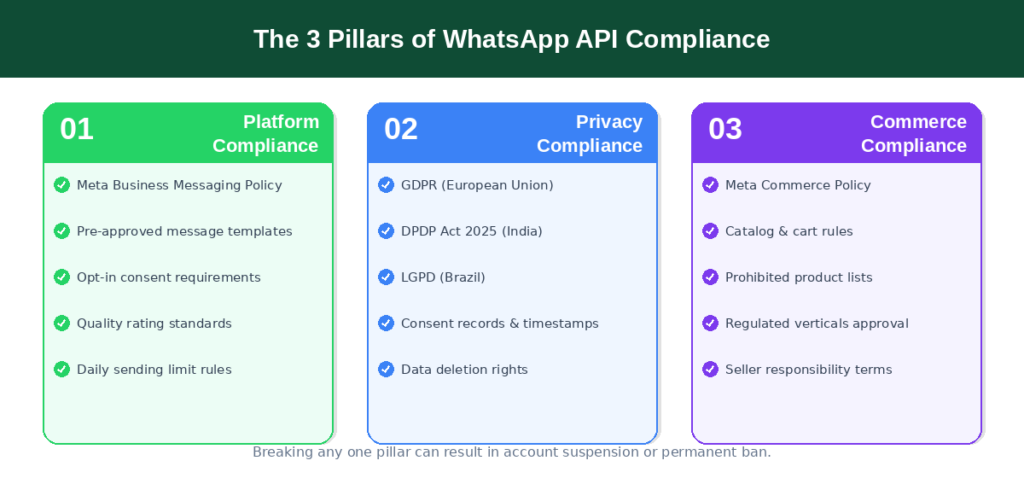
The Three Pillars: Platform, Privacy, and Commerce
- Platform Compliance — Following Meta’s Business Messaging Policy, including opt-in rules, pre-approved message templates, quality rating standards, and daily sending limits.
- Privacy Compliance — Adhering to applicable regional laws such as GDPR in Europe, India’s DPDP Act 2025, and LGPD in Brazil, governing how you collect, store, and use customer data.
- Commerce Compliance — Following the Meta Commerce Policy if your business uses WhatsApp Catalogs, shopping carts, or any in-chat selling features.
Why Non-Compliance Can Destroy Your Business Overnight
Here’s a scenario that’s become painfully common: a growing D2C brand builds its entire customer communication strategy around WhatsApp. They have 50,000 customers on their list. They’re sending promotional blasts daily. Then one Tuesday morning, their number is permanently banned. No appeal. No grace period. Fifty thousand customer relationships, gone. A permanent ban doesn’t just affect your messaging — it can signal to Meta’s systems that your organization cannot be trusted with its platform, potentially affecting future access to Facebook Ads, Instagram, and other Meta products.
WhatsApp Commerce Policy — Everything You Need to Know
If your business uses WhatsApp for selling — even just sharing a product catalog — the WhatsApp Commerce Policy is your rulebook. Most businesses are surprised to discover how comprehensive it really is.
Who Must Follow the Commerce Policy?
The Commerce Policy applies to any business that uses WhatsApp’s in-app shopping features: product catalogs, shopping carts, or any flow where customers can browse and buy through WhatsApp. Simply listing products in a catalog or sharing links to purchase puts you in scope.
Prohibited Products and Regulated Verticals
Meta maintains a strict list of items that cannot be sold or promoted on WhatsApp — illegal goods, counterfeit products, adult content, tobacco, weapons, and gambling services. Beyond outright prohibited items, certain industries fall into “Regulated Verticals” — sectors requiring explicit Meta approval before using the API for customer messaging. These include financial services, pharmaceuticals, healthcare, alcohol (approved in certain markets), and dating services.
Seller Responsibilities Under the Commerce Policy
WhatsApp and Meta take zero responsibility for transactions that happen through your business. You are solely responsible for:
- Publishing clear, accurate terms of sale, return policies, and delivery timelines
- Determining, collecting, and remitting applicable taxes for your jurisdiction
- Resolving customer disputes about orders, refunds, or product quality
- Ensuring your product listings are accurate and not misleading
Is WhatsApp Business Safe for Personal Use?
This is one of the most searched questions about WhatsApp, and it deserves a real answer.
The short version: WhatsApp Business is generally safe for everyday communication, but it’s not identical to personal WhatsApp in terms of privacy.
End-to-End Encryption: The Full Picture
Yes, WhatsApp still uses end-to-end encryption (E2EE) based on the Signal Protocol. The content of your personal messages is encrypted in transit. But when you message a business on WhatsApp, the privacy equation shifts. If that business uses Meta’s Cloud API, Meta acts as the data processor for that conversation. The business can store, analyze, and act on those messages for customer support, sales, or follow-up.
The Meta AI Privacy Issue You Need to Know About
In 2025, Meta integrated its AI assistant across WhatsApp. Conversations with Meta AI are not end-to-end encrypted — they’re processed on Meta’s servers and may be used to improve Meta’s AI models and, in some markets, inform ad targeting across Facebook and Instagram. There’s also a metadata concern: even when message content is encrypted, WhatsApp collects metadata—your phone number, device information, usage frequency, and contact relationships—shared within the Meta ecosystem.
WhatsApp Business API Explained
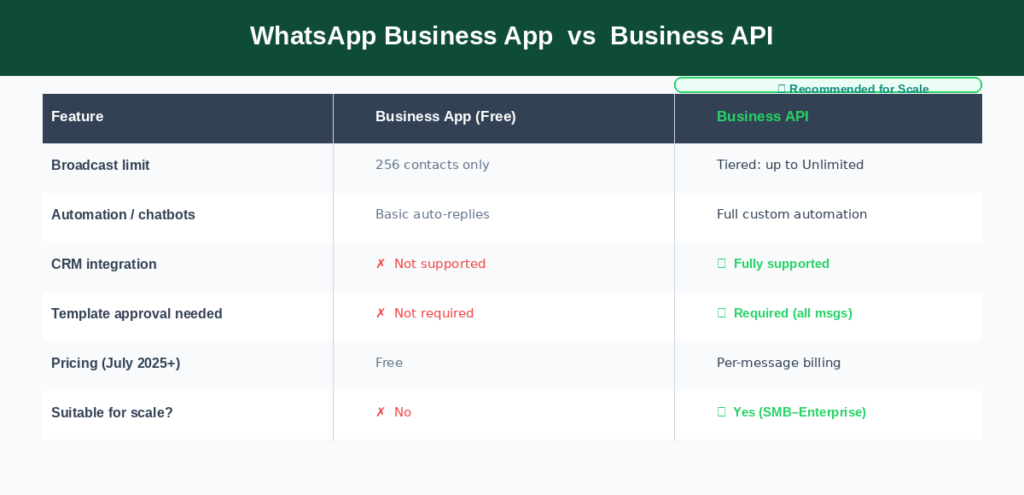
The WhatsApp Business API is Meta’s enterprise-grade solution for businesses that need to communicate with customers at scale, think thousands or hundreds of thousands of people. Unlike the free WhatsApp Business App, which caps broadcasts at 256 contacts, the API is built for automation, CRM integration, and high-volume messaging.
| Feature | Business App (Free) | Business API |
| Broadcast limit | 256 contacts only | Tiered: up to Unlimited |
| Automation / chatbots | Basic auto-replies only | Full custom automation |
| CRM integration | Not supported | Fully supported |
| Template approval needed? | No | Yes — all outbound msgs |
| Pricing (July 2025+) | Free | Per-message billing |
| Access method | App download | Via Meta or BSP |
| Suitable for scale? | No (personal/micro biz) | Yes (SMB to enterprise) |
Cloud API vs On-Premise: Which Should You Use in 2026?
In 2026, this decision is essentially made for you — the Cloud API is the standard, and the On-Premise API has been officially discontinued for new use cases. The Cloud API supports up to 500 messages per second, handles security updates automatically, and is significantly cheaper to operate. The only scenario where On-Premise might still be relevant is for government entities or banks in countries with extreme data localization laws.
New Pricing Model (Updated July 2025)
In July 2025, Meta switched from conversation-based pricing to per-message pricing. Here’s what that means:
- Marketing templates are charged per delivered message
- Utility messages within an open 24-hour service window are often free
- Authentication messages are billed at a lower rate than marketing messages
- User-Initiated Conversations are 30–40% cheaper than Business-Initiated Conversations
WhatsApp Policy for Bulk Messages
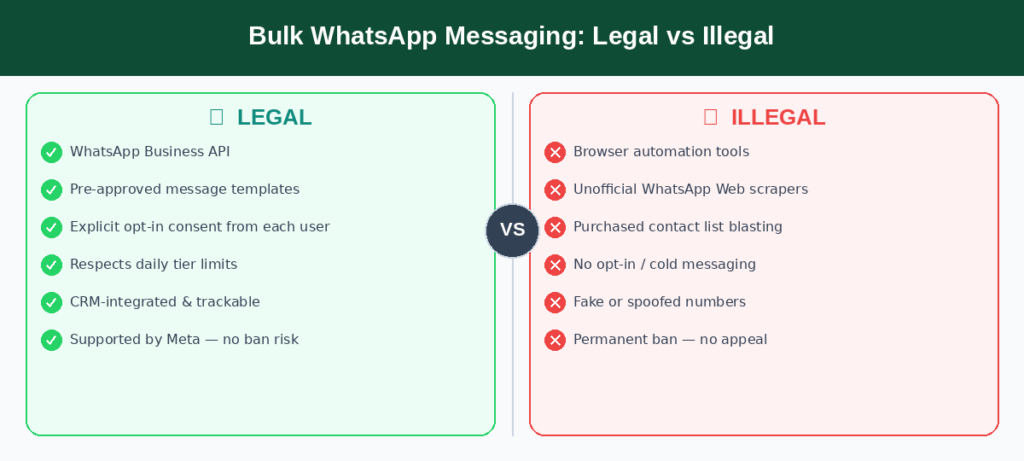
Let’s talk about bulk messaging and be direct about what’s legal and what will get you banned faster than you think.
The Legal Way vs the Illegal Way
There’s exactly one legal way to send bulk messages on WhatsApp: through the WhatsApp Business API, with pre-approved templates, to users who have explicitly opted in. Any other approach, browser extensions, unofficial automation tools, or apps that automate WhatsApp Web is a direct violation of the Terms of Service. Meta actively scans for the behavioral patterns these tools create. The question isn’t whether you’ll get caught — it’s when.
Why Unofficial Bulk Tools Get You Permanently Banned
Unofficial bulk tools create very specific patterns in Meta’s fraud detection systems: rapid-fire messages from one number to hundreds of contacts, often to numbers that haven’t opted in. There’s also a serious security risk most unofficial tools require you to log in via WhatsApp Web, which gives a third party access to your account, and its security practices are unknown.
WhatsApp Business Message Sending Limit Per Day (2026 Tiers)
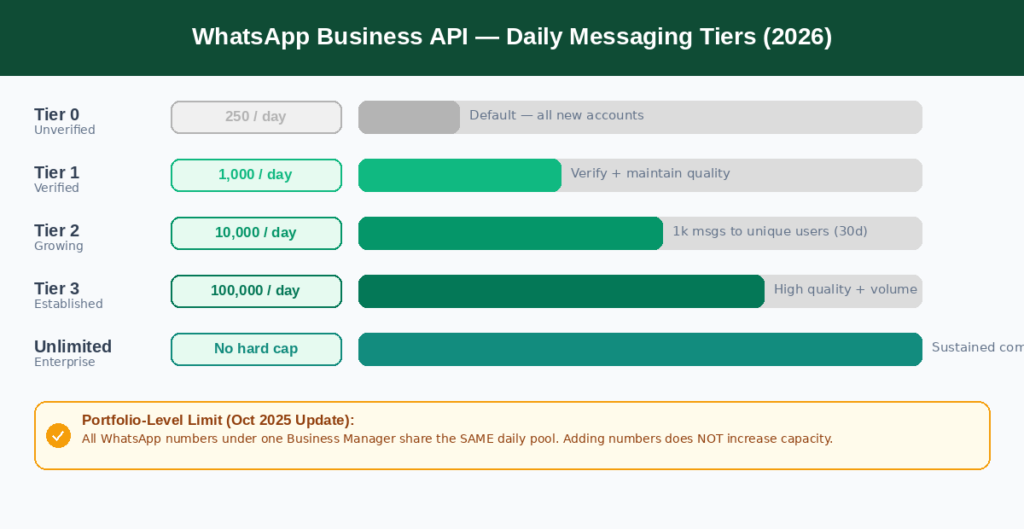
Understanding your daily sending capacity before planning any WhatsApp campaign is critical — and in 2026, the rules are significantly different from what most outdated documentation still describes.
The New Portfolio-Level Limit Model
Here’s the big change from October 2025: sending limits are no longer per phone number. They’re shared across your entire Meta Business Portfolio all WhatsApp Business phone numbers under your Business Manager account draw from the same daily pool. Adding more phone numbers no longer increases your total capacity.
2026 Tier Breakdown: From 250 to Unlimited
| Tier | Daily Messages | Speed | How to Reach |
| Tier 0 (Unverified) | 250 / day | Standard | Default for new accounts |
| Tier 1 | 1,000 / day | ~80 MPS | Verify + sustain quality rating |
| Tier 2 | 10,000 / day | ~80 MPS | Send 1k msgs to unique users in 30 days |
| Tier 3 | 100,000 / day | Up to 1,000 MPS | Consistent high quality + volume |
| Unlimited | No hard cap | Up to 1,000 MPS | Enterprise-grade, sustained compliance |
Pay special attention to Tier 0: unverified accounts now start at just 250 messages per day. Much of the documentation still online references 1,000 as the starting point — that was updated. Launch a campaign without checking your tier and you could exhaust your daily limit with the very first batch.
How to Upgrade Your Tier — Step by Step
Meta evaluates potential tier upgrades every six hours. To advance from Tier 1 to Tier 2: send at least 1,000 messages to unique users in a rolling 30-day period, maintain a medium or high quality rating on your templates, and avoid any policy violations during the evaluation window.
The User-Level Frequency Cap (Error Code 131049)
Since 2025, each WhatsApp user can receive approximately two marketing messages per day from all companies combined. If a user has already hit their daily quota from other brands, your message won’t be delivered — even if you’ve done everything perfectly. Meta returns error code 131049 when this happens. Seeing it frequently signals you should rethink sending times and shift more content into utility templates.
WhatsApp Business Policy Violation: Causes, Consequences & Recovery
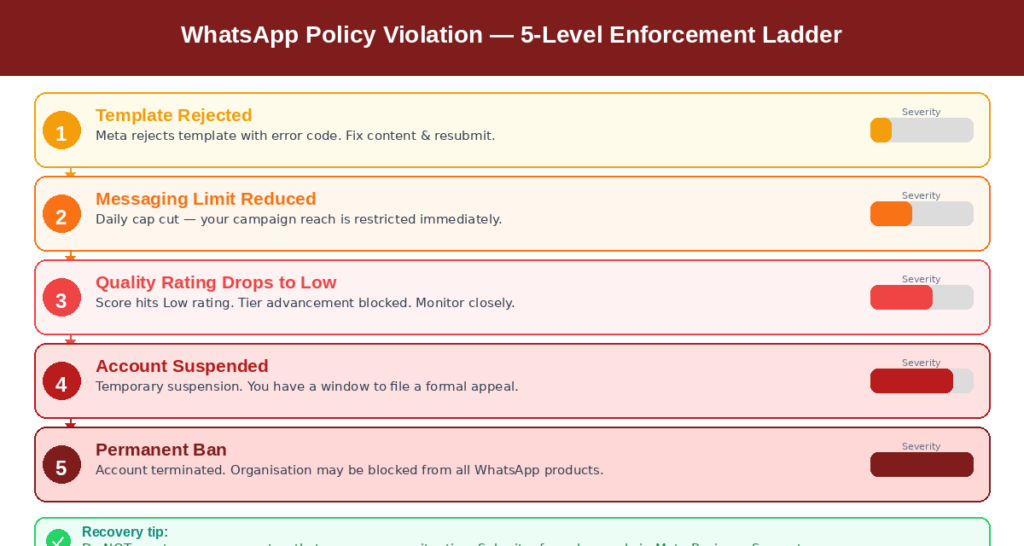
A policy violation isn’t always the result of obvious wrongdoing. Some of the most common violations happen to businesses that genuinely didn’t know they were breaking any rules.
What Triggers a Policy Violation?
Template violations are most common — promotional language in a utility template, clickbait CTAs, vague content, or sending before Meta approval. Consent violations are often more serious: messaging people via SMS or email without a separate WhatsApp opt-in is a direct violation. Pre-checked boxes and imported contact lists without re-confirmed WhatsApp consent don’t qualify. Behavior violations occur when block and report rates deteriorate your quality metrics — regardless of whether you think your messages are valuable.
The Five-Level Enforcement Ladder
- Template rejection — Correctable with an edit and resubmission.
- Messaging limit reduction — Daily cap is cut, restricting campaign reach.
- Quality rating downgrade — Score drops to Low, preventing tier advancement.
- Account suspension — Temporary suspension pending Meta’s review, with an appeal window.
- Permanent ban — Account terminated; your organization may be blocked from future WhatsApp products.
How to Recover a Suspended or Banned Account
Don’t create a new account — that’s a further violation. Review the template rejection logs in WhatsApp Manager, address the specific issue, and submit a formal appeal through Meta Business Support, including evidence of compliant opt-in practices and a quality improvement plan. If you work with a BSP, engage their compliance team immediately — they have direct escalation channels.
WhatsApp Business Message Settings
Getting your message settings right is both a compliance requirement and a best practice for deliverability and engagement.
Template Message Settings You Must Configure
Every outbound business-initiated message must use a pre-approved template. The most common compliance mistake is incorrect categorization. Meta distinguishes between Marketing (promotional, offers), Utility (order updates, delivery notifications), and Authentication (OTPs, verification). Using promotional language in a utility template isn’t just a rejection risk — it’s a compliance violation that can flag your account.
The 24-Hour Customer Service Window
When a customer sends your business a message, a 24-hour free-form reply window opens. During this window, you can respond with any content without a pre-approved template. Outside this window, only approved templates can be sent. Smart businesses design flows that actively invite inbound messages, then use those windows for the more personal, high-value interactions that templates alone can’t deliver.
WhatsApp Business Privacy Settings
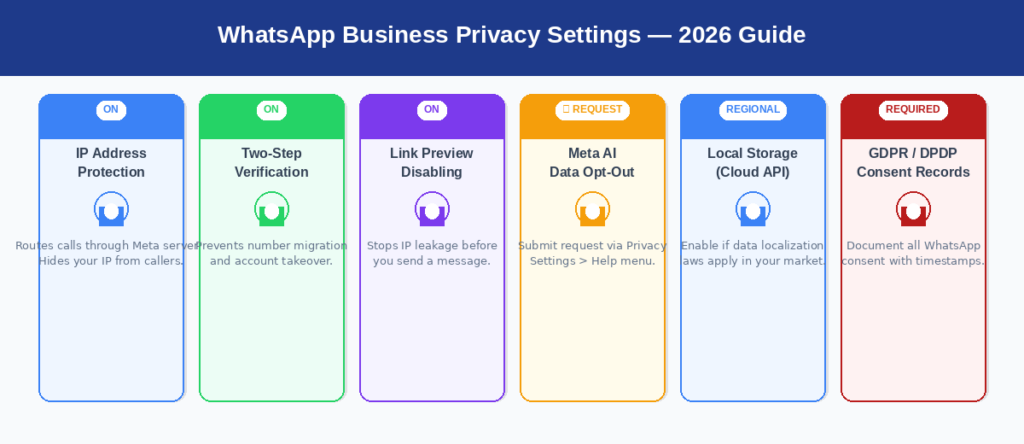
Privacy settings in 2026 go far beyond who can see your profile picture. For businesses, they’re a compliance mechanism — and configuring them correctly is part of your legal obligation under multiple data protection frameworks.
Advanced Privacy Features Available in 2026
IP Address Protection for Calls routes WhatsApp calls through Meta’s servers, masking your device’s IP address. Disabling link previews prevents WhatsApp from fetching URL previews a process that reveals your IP address to the target server before you even send the message. Two-step verification for your API number is non-negotiable to prevent unauthorized number migration or account takeover.
GDPR, DPDP Act, and Regional Compliance
EU businesses must have a documented lawful basis for processing (almost always explicit consent), consent records with timestamps, a privacy notice that specifically mentions WhatsApp, and a functioning mechanism for data deletion requests. For Indian businesses, the DPDP Act 2025 introduced new data fiduciary obligations. Despite a 2025 tribunal ruling allowing Meta to share WhatsApp data with its ad ecosystem, individual businesses remain independently responsible for their own DPDP compliance. Never apply a single privacy policy across all markets and assume you’re covered.
WhatsApp Business API Compliance Checklist
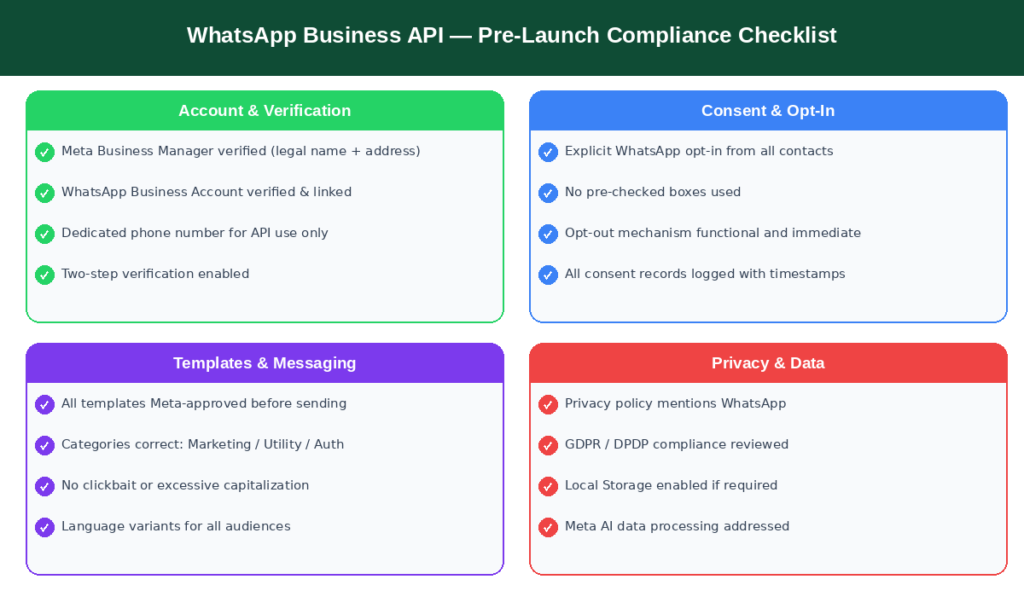
Use this checklist before every new campaign, integration, or messaging initiative. Bookmark it and review quarterly.
Account & Verification
- Meta Business Manager account verified with legal name and address
- WhatsApp Business Account verified and linked to Business Manager
- Dedicated phone number registered exclusively for API use
- Two-step verification enabled on your API business number
Consent & Opt-In
- All contacts have given explicit WhatsApp opt-in (not just SMS/email consent)
- Opt-in uses active confirmation, not pre-checked boxes
- Opt-in clearly describes the types of messages they will receive
- Opt-out mechanism is functional and honored immediately
- All consent records are logged with timestamps
Templates
- All outbound templates are Meta-approved before sending
- Template categories correctly match content (Marketing / Utility / Auth)
- No clickbait, misleading language, or excessive capitalization
- Variable placeholders use correct {{1}} formatting
- Language-specific variants created for multilingual audiences
Messaging Limits & Quality
- Current portfolio tier confirmed in WhatsApp Manager
- Daily volume planned within portfolio capacity, not per-number assumptions
- Quality rating monitoring and alerts configured
- Error code 131049 (frequency cap) tracked and actioned
Privacy & Data
- Privacy policy is published and mentions WhatsApp as a communication channel
- GDPR/DPDP/applicable regional law compliance reviewed with legal counsel
- Local Storage is enabled if your region requires data localization
- Meta AI data processing is addressed in your privacy notices
Conclusion
WhatsApp API compliance in 2026 isn’t a one-time box to tick — it’s an ongoing operational discipline that requires attention, monitoring, and periodic review. The businesses that build compliance into their foundation from the start don’t just avoid penalties. They build messaging programs that perform better, reach higher quality audiences, and scale sustainably over time.
Remember the three rules that matter most: never message anyone who hasn’t explicitly opted in on WhatsApp; never send a template that hasn’t been approved in the correct category; and monitor your quality rating and sending limits proactively — not after a ban has landed. The businesses winning on WhatsApp right now aren’t the ones blasting the most messages. They’re the ones sending the right messages to the right people in the right way. That’s not just compliance. That’s a genuine competitive advantage.
Frequently Asked Questions (FAQs)
What exactly is WhatsApp API compliance, and why does it matter?
WhatsApp API compliance means following Meta’s rules for business messaging via the API — covering user opt-in consent, approved templates, data privacy laws, and commerce restrictions. It matters because non-compliance leads to template rejection, reduced sending limits, account suspension, and, in serious cases, permanent bans that eliminate your entire WhatsApp customer base.
How many WhatsApp messages can I legally send per day in 2026?
Unverified accounts start at 250 messages per day (Tier 0). Verified accounts scale through 1,000 (Tier 1), 10,000 (Tier 2), 100,000 (Tier 3), and Unlimited. Since October 2025, these limits are shared across your entire Meta Business Portfolio — not per phone number.
Can I use WhatsApp Business for personal conversations?
Technically yes, but it’s not recommended for sensitive matters. WhatsApp Business retains E2EE for personal messages, but business conversations may be processed by Meta’s infrastructure. Meta’s 2025 AI integration means AI interactions are not E2EE and may be used for ad targeting. For casual communication, it’s safe — for legally or medically sensitive conversations, consider a more privacy-preserving channel.
What’s the quickest way to recover from a WhatsApp Business policy violation?
Don’t create a new account — that worsens your situation. Review the specific rejection code in WhatsApp Manager, correct the issue, and submit a detailed appeal through Meta’s Business Support portal with evidence of compliant opt-in flows and a quality improvement plan. If you work with a BSP, loop them in immediately.
Do I need separate opt-in consent for WhatsApp if I have email or SMS consent?
Yes, absolutely. WhatsApp consent is completely separate from email or SMS consent. A customer agreeing to your marketing emails has given zero permission to be messaged on WhatsApp. You need an explicit, specific opt-in naming WhatsApp as the channel — documented with a timestamp. Pre-ticked boxes and vague consent language do not meet the standard.