WhatsApp for Ecommerce: The Complete Guide to Boost Sales, Automate Support & Scale Your Online Store in 2026

Table of Contents
Let me ask you something. When was the last time you opened a marketing email within three minutes of receiving it? Probably never, right? But I bet you’ve opened a WhatsApp message within seconds of that little ping. That’s the difference we’re talking about here.
WhatsApp isn’t just a chat app anymore. It’s quietly become one of the most powerful ecommerce channels on the planet — and if you’re not using it yet, you’re leaving money on the table. From abandoned cart recovery to order updates, from chatbots that sell while you sleep to full-blown in-chat shopping experiences, WhatsApp is redefining how online stores interact with their customers.
In this guide, I’m going to walk you through absolutely everything you need to know about WhatsApp for ecommerce — the what, the why, the how, and the “wow, I should have started this yesterday.” Let’s dive in.
What is WhatsApp for e-commerce?
The term WhatsApp ecommerce refers to different ways online stores can use WhatsApp to drive engagement, revenue, and customer satisfaction. This includes sending personalized promotional messages, keeping customers updated with timely transactional alerts, and designing conversational shopping experiences.
Think of it this way: your website is your storefront, email is your newsletter, and WhatsApp? WhatsApp is that incredibly knowledgeable, friendly sales associate who’s always available, always helpful, and never pushy. It’s the channel where customers feel comfortable enough to ask questions, browse products, get updates, and even complete purchases — all without leaving the chat window.
WhatsApp ecommerce is a two-way communication platform where you can seamlessly engage with your customers, sell your products, and use your WhatsApp ecommerce store as a conversational marketing platform. Whether you’re a small D2C brand shipping handmade candles or a massive retailer processing thousands of orders daily, WhatsApp fits into your stack.
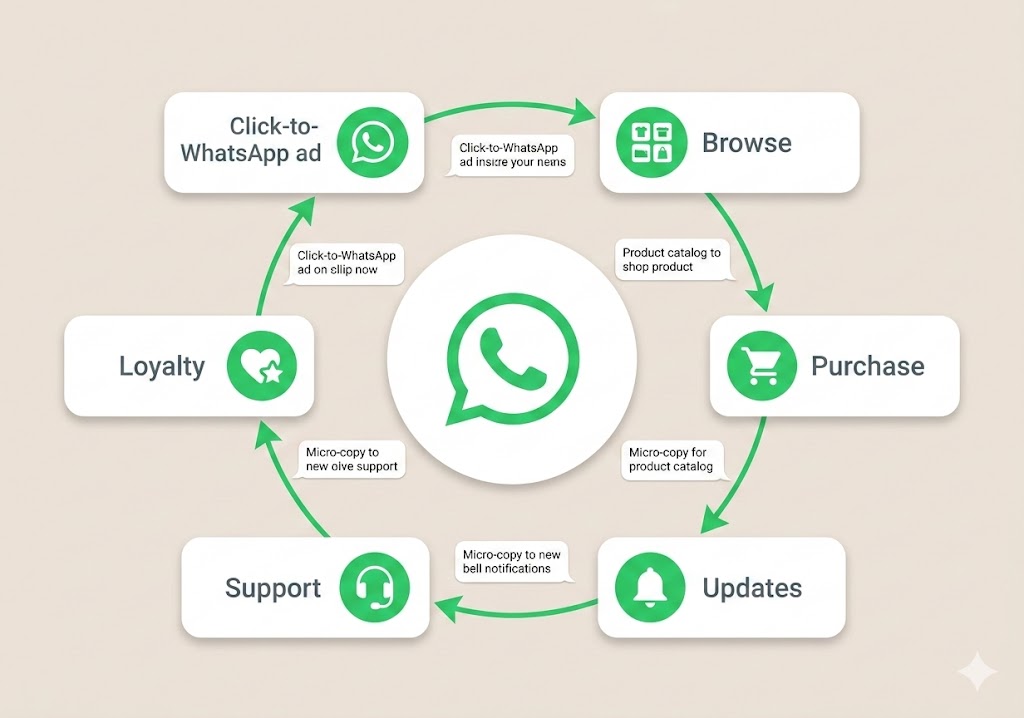
The beauty is that it works across the entire customer journey — from the moment someone discovers your brand through a click-to-WhatsApp ad, all the way through to post-purchase loyalty and repeat buying.
Why Every E-commerce Brand Needs WhatsApp Right Now
Still on the fence? Let me hit you with some numbers that should make the decision pretty clear.
Mind-Blowing WhatsApp Ecommerce Statistics You Can’t Ignore
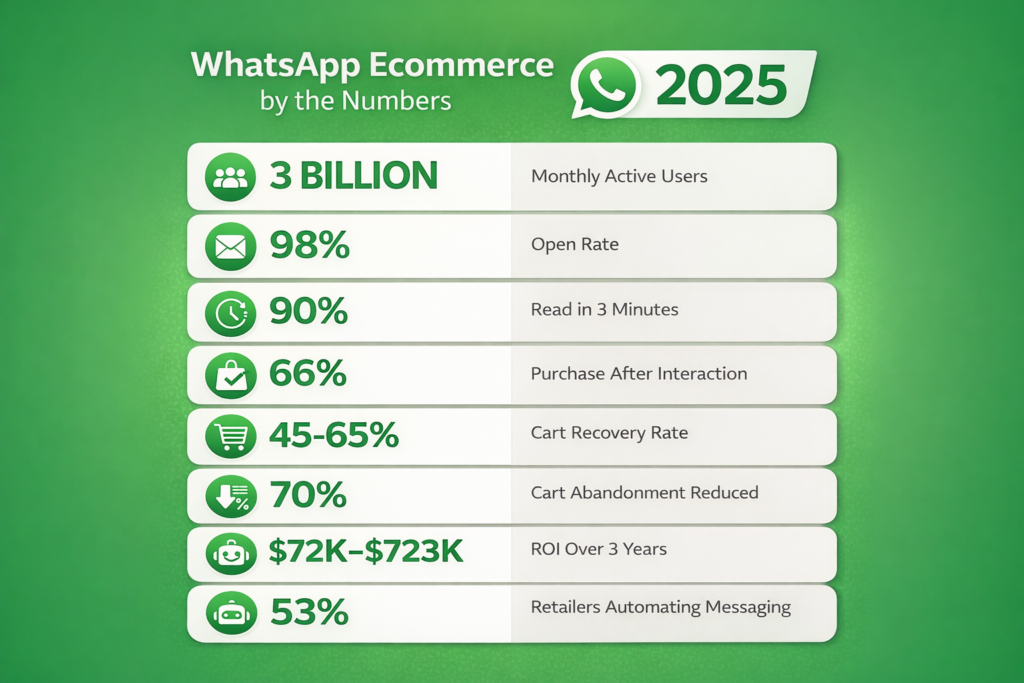
WhatsApp officially reached 3 billion active users every month across 180+ countries, making it the world’s most popular messaging app. That’s almost half the planet. WhatsApp messages have a 98% open rate, making it one of the most effective messaging platforms for direct communication. 90% of messages are read within 3 minutes of being sent, which is significantly faster than emails, where response times are often much longer.
Compare that to email’s 20% open rate and you start to see why this channel is a game-changer.
WhatsApp’s own case studies show 66% of customers purchase interacting with a brand on WhatsApp. Clarins, a French cosmetics company, used WhatsApp for their National Lipstick Day campaign and achieved a 90% open rate and a conversion rate that was seven times higher than email. With website cart abandonment still above 70%, WhatsApp is becoming the most reliable recovery channel. High-intent reminders sent through WhatsApp Business API retargeting see 45–65% open rates, far higher than email or SMS.
And here’s the kicker for ROI-focused brands: Forrester found that the average return on investment was “$72,000 for the medium-sized and $723,000 for the large composite organizations over three years.”
These aren’t fluffy vanity metrics. These are real, bottom-line numbers. The opportunity is massive, and the window to be an early mover is still wide open.
WhatsApp Business App vs WhatsApp Business API: Which One Is Right for Your Store?
This is where most people get confused, so let me make it crystal clear.
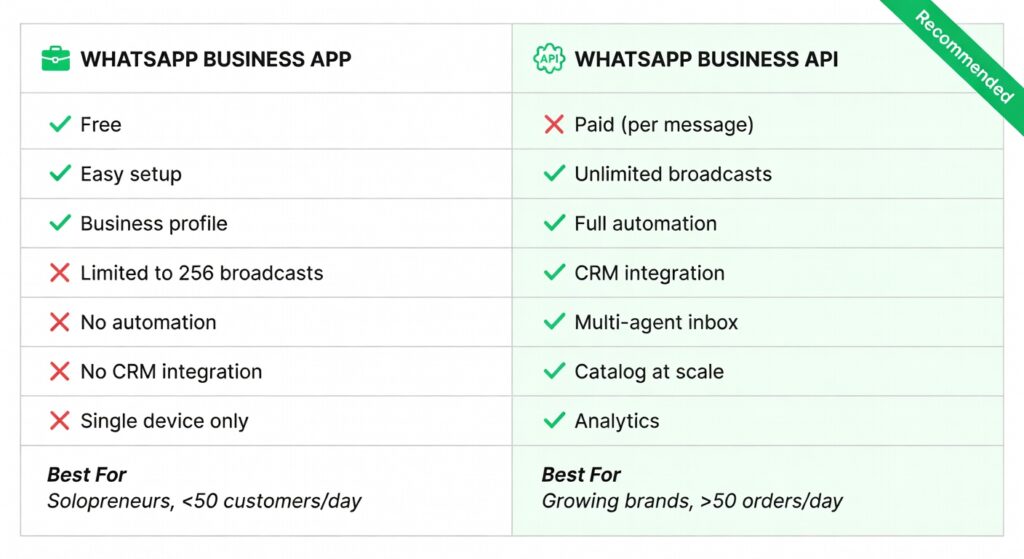
E-commerce teams can use WhatsApp through one of the WhatsApp business products — the WhatsApp Business App or the WhatsApp Business Platform (also known as the WhatsApp Business API).
The WhatsApp Business App is free and designed for small businesses. The WhatsApp Business App is designed for solopreneurs and small businesses who want to manage one-to-one customer communications. It’s free to download and easy to create a business profile. However, the app is not a good choice for bigger stores with large customer bases as it can’t manage communications at scale.
Messages can be sent only to 256 contacts at one time and it lacks integration with other enterprise systems like your CRM or e-commerce site, so you cannot automatically send order updates, delivery statuses, and timely reminders to customers; you need to do it manually.
The WhatsApp Business API (now officially called the WhatsApp Business Platform) is where the real power lives. The platform offers three application programming interfaces (APIs) that allow large e-commerce businesses to effectively communicate with their sizable volume of customers.
How Does the WhatsApp Business API Work for E-commerce?
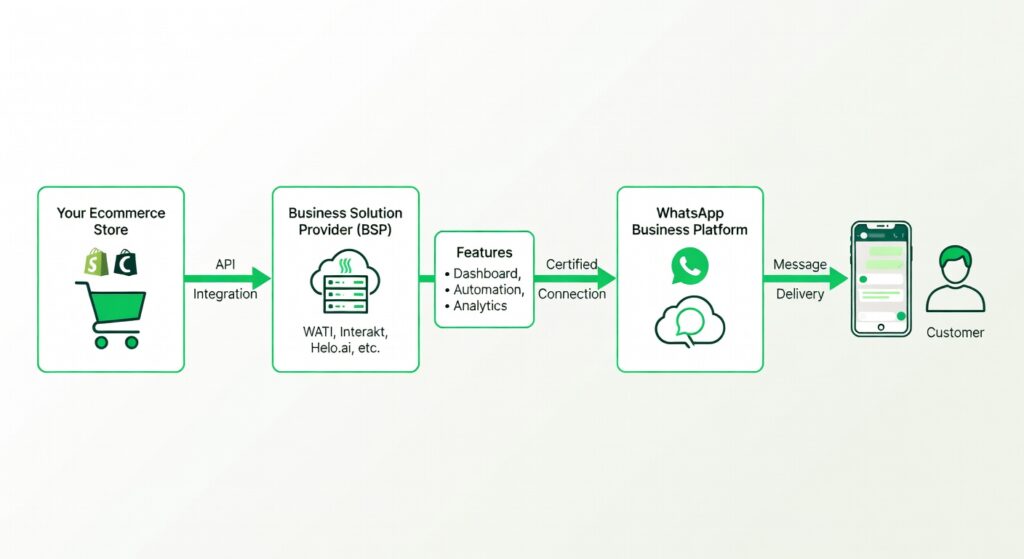
Since it is an API, there is no front-end interface provided and no app. The idea is that businesses will take the WhatsApp API endpoint to integrate it into their technology stack.
That means you’ll need a Business Solution Provider (BSP) — a company certified by Meta to give you access to the API along with tools like dashboards, team inboxes, chatbot builders, automation flows, and analytics. Larger ecommerce businesses usually partner with a Business Solution Provider (BSP) for their WhatsApp marketing needs. BSPs are companies that Meta has certified as WhatsApp experts.
The API enables automation, CRM integration, catalogs, payments, multiple agents, and broadcast campaigns—features not available in the WhatsApp Business app.
Quick rule of thumb: If you process more than 50 orders a day or have a growing customer list beyond a few hundred contacts, go API. Period.
How to Set Up WhatsApp for Your E-commerce Business (Step-by-Step)
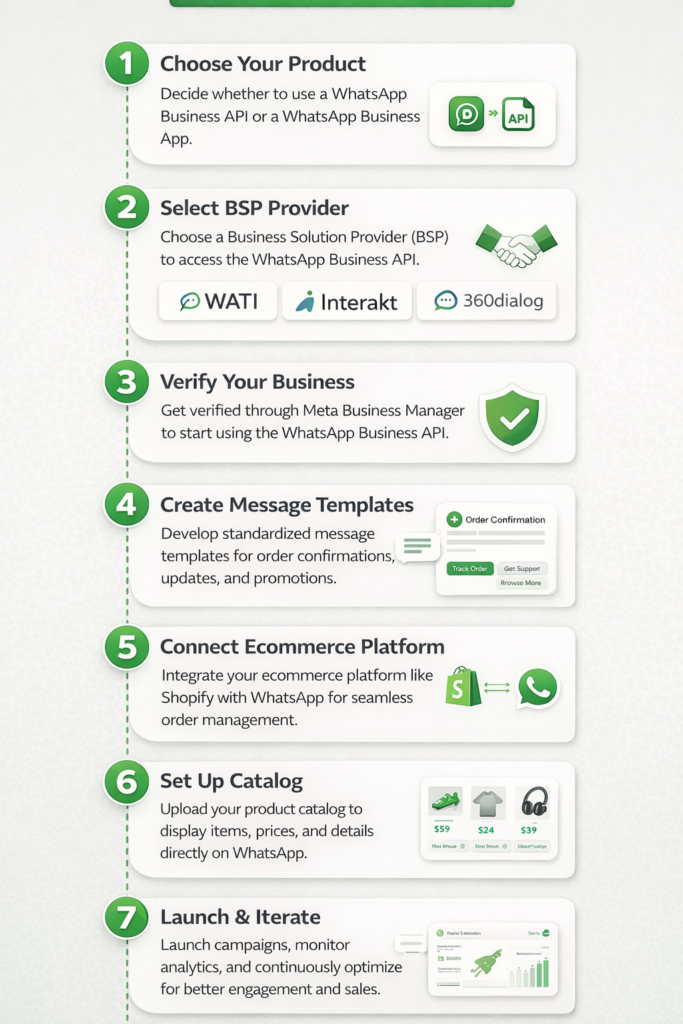
Setting up isn’t as complicated as it sounds. Here’s the streamlined path:
Step 1: Choose Your WhatsApp Product. Decide between the free Business App (good for testing) or the full Business API (needed for scale and automation).
Step 2: Select a Business Solution Provider. If going the API route, pick a BSP like WATI, Interakt, AiSensy, Helo.ai, or work through a larger platform like Klaviyo, Braze, or ActiveCampaign that offers built-in WhatsApp integration.
Getting started with WhatsApp API for your ecommerce business is as simple as connecting your platform and setting up tools like ActiveCampaign WhatsApp Messaging. As an official Business Solutions Provider, ActiveCampaign connects directly with your WhatsApp API and makes setup, handling, and compliance a breeze.
Step 3: Verify Your Business. You’ll need a Meta Business Manager account. Submit your business details, verify your phone number, and get approved.
Step 4: Create Message Templates. WhatsApp requires you to get message templates pre-approved by Meta before you can send outbound (business-initiated) messages. Design templates for order confirmations, shipping updates, cart reminders, and marketing broadcasts.
Step 5: Connect Your Ecommerce Platform. Platforms like Interakt offer plug-and-play integrations that sync catalog, orders, customer profiles, and automate journeys. Most BSPs have native integrations with Shopify, WooCommerce, Magento, and BigCommerce.
Step 6: Set Up Your Catalog. WhatsApp offers ecommerce brands its catalog feature, making it a complete shopping platform. Brands can display their products and services in a digital catalog, making it easy for customers to browse and even select items to add to their shopping cart right in WhatsApp.
Step 7: Launch & Iterate. Start with a few key automations (welcome message, abandoned cart, order confirmation), monitor performance, and expand from there.
7 Powerful WhatsApp Ecommerce Use Cases That Drive Revenue
This is the meat of the article. These are the use cases that separate brands making money on WhatsApp from brands just “trying it out.”
1. Abandoned Cart Recovery on WhatsApp
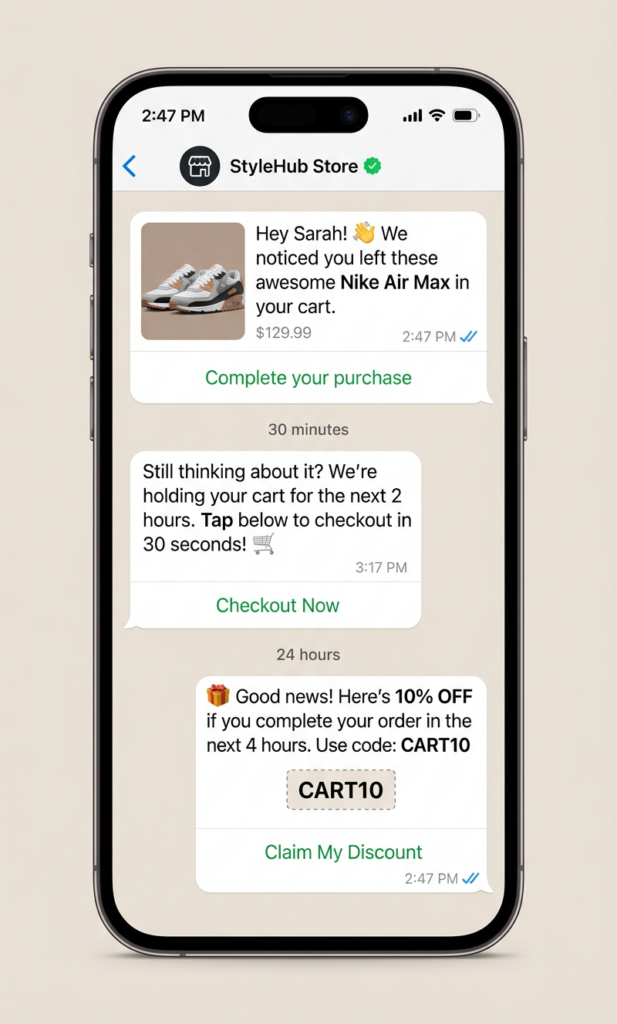
This is the single highest-ROI use case for ecommerce brands on WhatsApp, bar none. Ecommerce businesses often face a 69.9% cart abandonment rate. With WhatsApp Business API, you can automate reminders to reach consumers about the products and offers left behind. Also, the tool lets you offer exclusive discounts to encourage purchase completion.
The beauty of WhatsApp for cart recovery is timing and visibility. Unlike emails that sit unread for hours (or forever), a WhatsApp message pops up on the home screen and gets read almost instantly. Send the first reminder 30–60 minutes after abandonment. Follow up with a second message offering a small incentive (free shipping, 5% off) within 24 hours.
Companies using WhatsApp API report 30-60% support cost reduction, 70% cart recovery improvement, and 25% drops in abandonment.
2. Automated Order Updates & Shipping Notifications
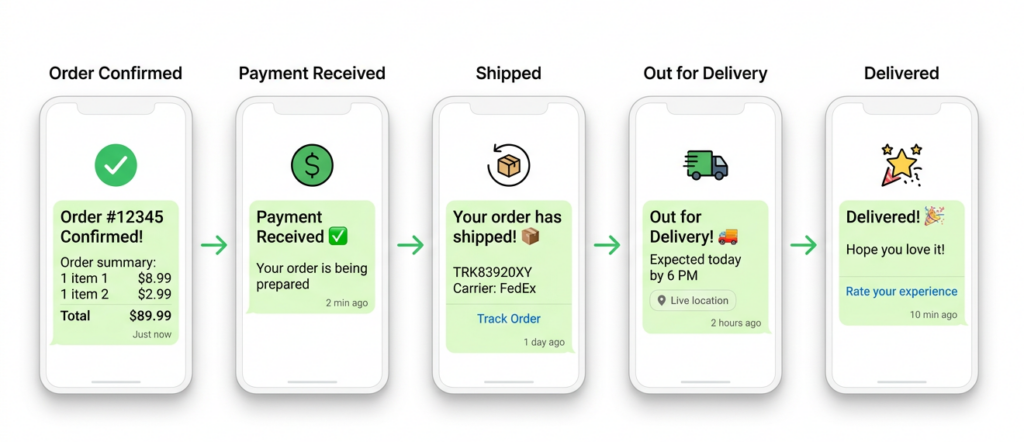
Once a customer places an order, the anxiety begins. “Did they get my order? When will it ship? Where is it right now?” Customers receive timely updates on their purchases.
With the API, you can automate the entire post-purchase communication flow:
order confirmation → payment received → shipped → out for delivery → delivered → feedback request.
Each touchpoint is an opportunity to build trust and reduce “Where is my order?” support tickets.
WhatsApp Business API enables live location-sharing, for deliveries, and order tracking.
3. WhatsApp Chatbot for Customer Support
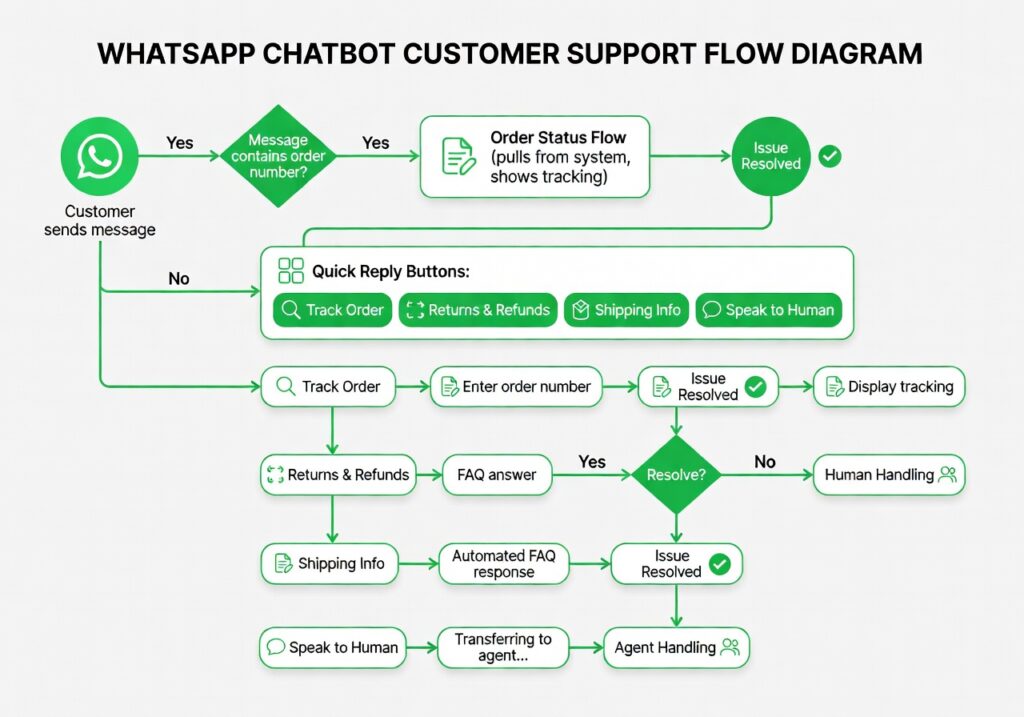
A WhatsApp chatbot for e-commerce is an automated messaging tool that helps online stores communicate with customers directly through WhatsApp. It can handle inquiries, process orders, and provide customer support instantly, enhancing the shopping experience and streamlining operations.
This isn’t about replacing your human support team. It’s about letting the bot handle the 80% of repetitive questions — “What’s your return policy?”, “Where’s my order?” “Do you ship to [country]?” — so your agents can focus on complex, high-value conversations. Automating up to 80% of routine queries frees your team to focus on high-value conversations and complex support issues.
Chatbots provide 24/7 support, answer FAQs, recommend products, qualify leads, and route to agents. This cuts response times and lifts conversions while keeping costs predictable.
4. Product Discovery & Catalog Messaging
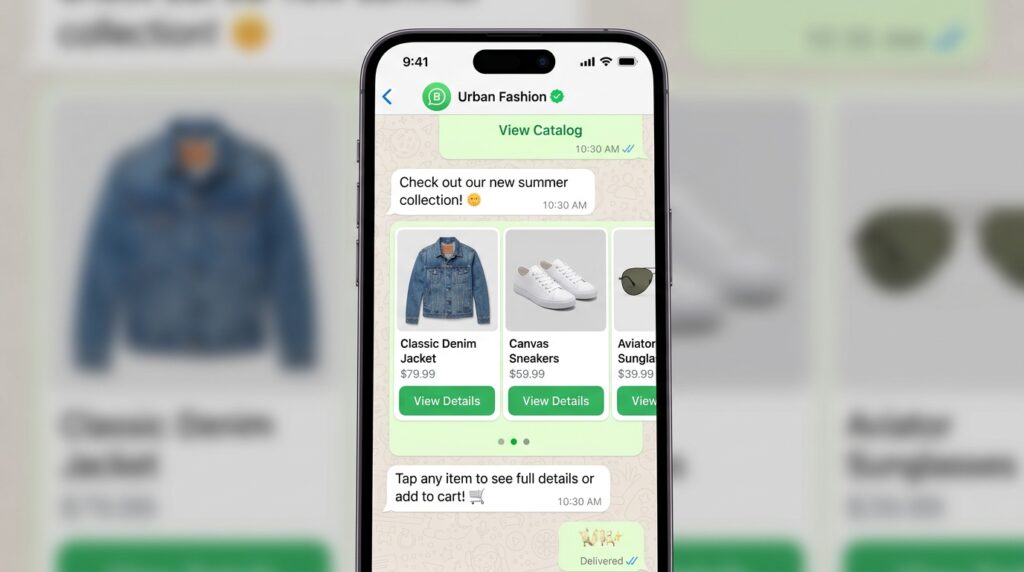
When used to its full potential, WhatsApp lets you add your entire product catalog to the app. This means users can browse your store, add items to their carts, and complete their purchases without going to an external site or app.
Think of it as bringing your Shopify store inside WhatsApp. You can send carousel messages showcasing new arrivals, seasonal picks, or personalized recommendations based on browsing history. A WhatsApp ecommerce bot can send carousels with images, prices, and direct purchase links—making it easier for shoppers to explore options and add items to their cart instantly. Carousels are perfect for new arrivals, bundle offers, or highlighting best-sellers in a visually engaging way.
5. Personalized Marketing Campaigns & Broadcasts
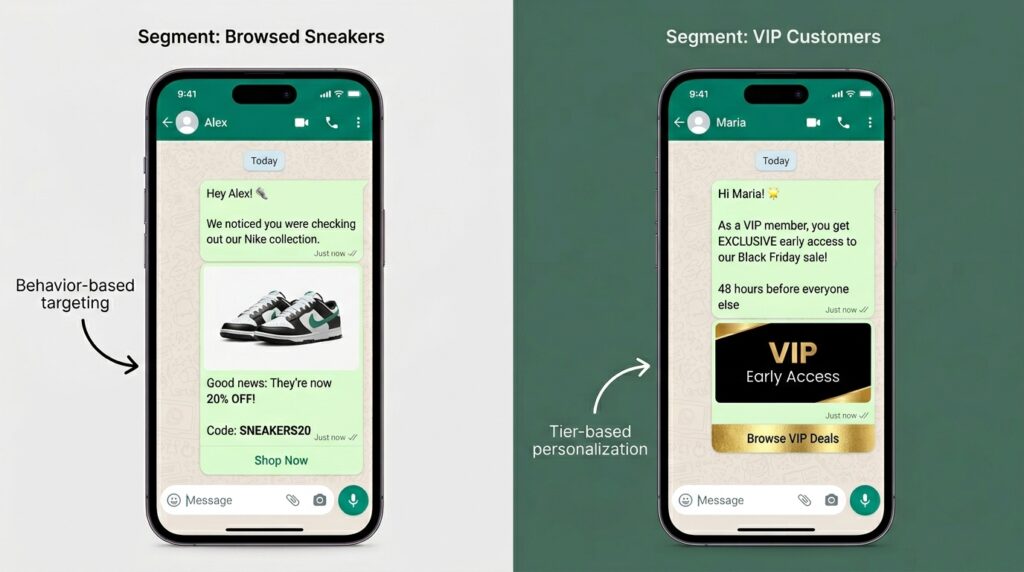
For retail and e-commerce, you can send personalized promotions, abandoned cart messages, and exclusive discounts. Create in-thread shopping experiences with WhatsApp Commerce.
The keyword here is personalized. This isn’t about blasting your entire contact list with the same generic message. 2Build dynamic segments such as “Browsed Sneakers Twice” or “Purchased in Last 30 Days.” Tailor your messaging—sneaker browsers get styling tips, recent buyers receive cross-sell offers.
WhatsApp personalization and segmentation based on behavior can improve campaign performance by 10–15%.
6. COD Confirmation & Fake Order Prevention
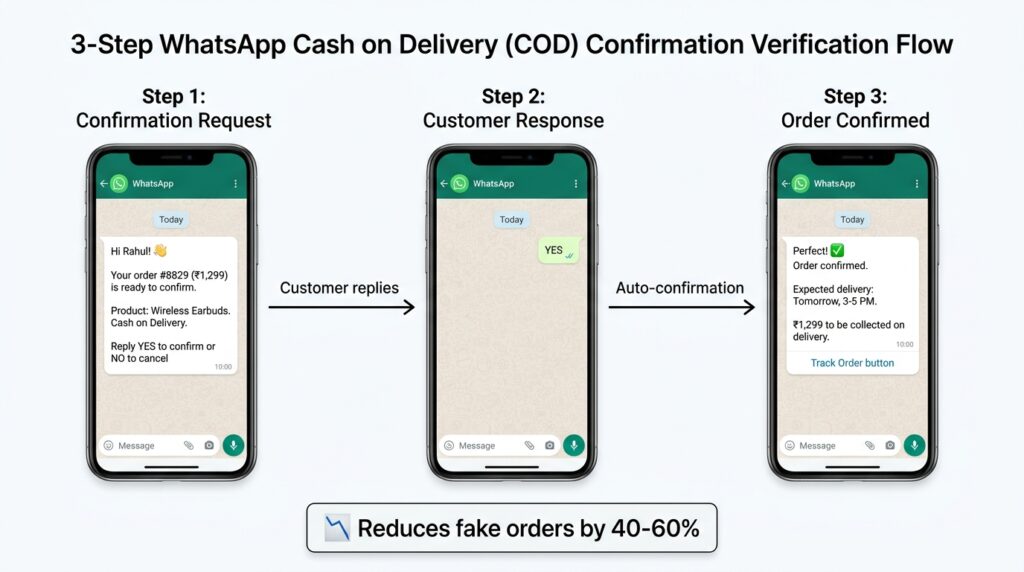
If you operate in markets like India, the Middle East, or Southeast Asia, where Cash on Delivery is king, you know the pain of fake orders and high RTO (Return to Origin) rates. WhatsApp automation allows you to send an instant COD confirmation message after order placement — “Hey [Name], please confirm your order of [Product] for ₹[Amount] by replying YES.” This simple step verifies intent and dramatically reduces fake orders and returns.
7. Post-Purchase Upselling & Loyalty Programs
Embed “You might also like” messages right in your order confirmation template. Post-purchase upsells—when the buyer is already in a buying mindset, can add 10–20% to your average order value.
Beyond upsells, you can use WhatsApp to run loyalty programs — VIP early-access sales, birthday discounts, referral rewards, and re-engagement campaigns for dormant customers. The personal, conversational nature of WhatsApp makes these messages feel less like marketing and more like a friend tipping you off about a great deal.
WhatsApp Marketing for Ecommerce: Strategies That Actually Work
Let’s talk strategy. Because having the tools is one thing; knowing how to use them is another.
Unlike one-way tactics like social media ads, search engine promotions, SMS, and emails, WhatsApp adds a human touch, taking your e-commerce business one step closer to “conversational marketing.”
Strategy 1: Click-to-WhatsApp Ads. Leverage Facebook and Instagram’s “Click to WhatsApp” ad format to drive cold audiences directly into chat. Craft compelling ad creative and set your destination to a WhatsApp Business link—making it seamless for prospects to ask questions and convert.
Strategy 2: Opt-In Lead Magnets. Offer a free e-book or a 10% discount voucher in exchange for opting into your WhatsApp list. Use chat triggers to immediately deliver the lead magnet file or discount code. This strategy builds your subscriber base while demonstrating the power of WhatsApp Marketing for ecommerce and lead generation.
Strategy 3: Multi-Channel Orchestration. Don’t put all your eggs in one basket. Connecting WhatsApp to other channels (like email and social media) is crucial for an omnichannel strategy. It prevents your messages from being lost, increases conversions by guiding users through the sales funnel, and avoids data silos that can create a fragmented customer experience.
Strategy 4: Frequency Discipline. This is critical. Stick to 1–2 valuable updates a week. Too many messages can lead to opt-outs or muted notifications. Think of your WhatsApp list as a precious asset — treat it with respect.
Strategy 5: Rich Media & Interactive Elements. WhatsApp isn’t limited to text. Brands can send product images, demo videos, PDFs, catalogs, and clickable buttons that guide customers to the next step.
WhatsApp Automation for Ecommerce: Workflows You Should Set Up Today
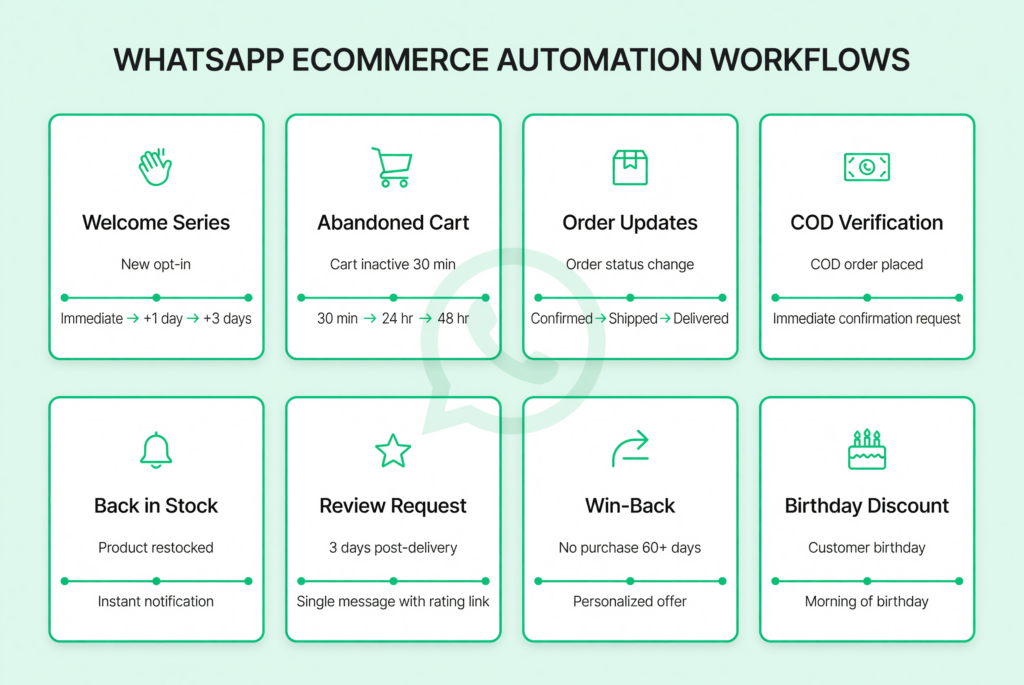
Automation is where WhatsApp goes from “nice to have” to “absolute game-changer.” Here are the must-have workflows every e-commerce store should set up:
- Welcome Series — Triggered when someone opts in. Greet them, introduce your brand, and offer a first-purchase incentive.
- Abandoned Cart Flow — 30-min reminder → 24-hour nudge with incentive → 48-hour final chance.
- Order Confirmation & Updates — Automated at each stage: confirmed → shipped → out for delivery → delivered.
- COD Verification — Instant order confirmation message for cash-on-delivery orders.
- Back-in-Stock Alerts — Notify customers when items they viewed come back.
- Review & Feedback Request — 3–5 days after delivery, ask for a review.
- Win-Back Campaign — Re-engage customers who haven’t purchased in 60+ days.
- Birthday / Anniversary Discounts — Triggered personalized offers on special dates.
Use WhatsApp Business API for scaling, automation, and multi-agent support, especially for growing DTC and Shopify stores. Automated WhatsApp flows can increase conversions and reduce the support load of DTC stores. When automation is handling 60-80% of conversations in free windows, your net WhatsApp costs drop dramatically while customer satisfaction and conversion rates go up. The channel becomes more efficient, not more expensive.
WhatsApp Flows for Ecommerce: The Secret Weapon No One Is Talking About
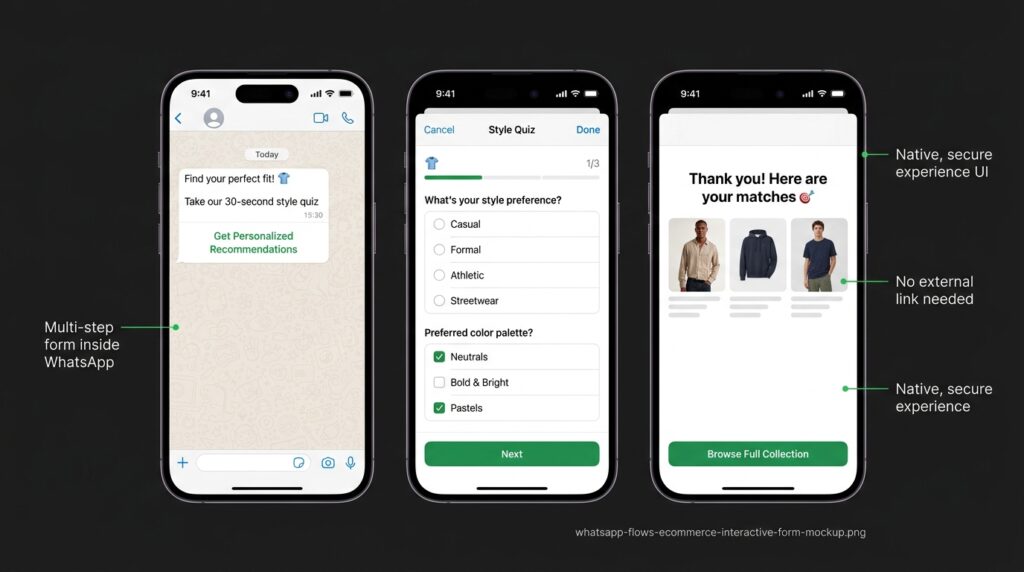
Now here’s a feature that most of your competitors are completely sleeping on: WhatsApp Flows.
Use WhatsApp Flows to help customers book reservations. But Flows go way beyond that. They are native, in-app multi-screen experiences — think of them as mini forms and interactive journeys that customers complete without ever leaving WhatsApp.
For e-commerce, Flows unlock incredible possibilities:
- Size Guide Selectors — Help customers pick the right size through an interactive quiz.
- Lead Capture Forms — Collect name, email, and preferences during a promotional campaign.
- Order Forms — Let customers fill out custom order details (engravings, color choices) inside WhatsApp.
- CSAT Surveys — Collect customer satisfaction feedback post-delivery.
- Address Collection — Grab shipping addresses for COD orders directly in chat.
Close the loop in chat: collect feedback with WhatsApp Flows or list messages and guide issue resolution and returns with structured steps and proactive updates.
The reason this is a “secret weapon” is simple: almost nobody is creating dedicated content or implementation guides around WhatsApp Flows for ecommerce. The search competition is extremely low, the feature is powerful, and brands that adopt it early will have a significant edge.
WhatsApp Business API Pricing: What Ecommerce Brands Need to Know in 2025
Let’s address the elephant in the room: what does all this cost?
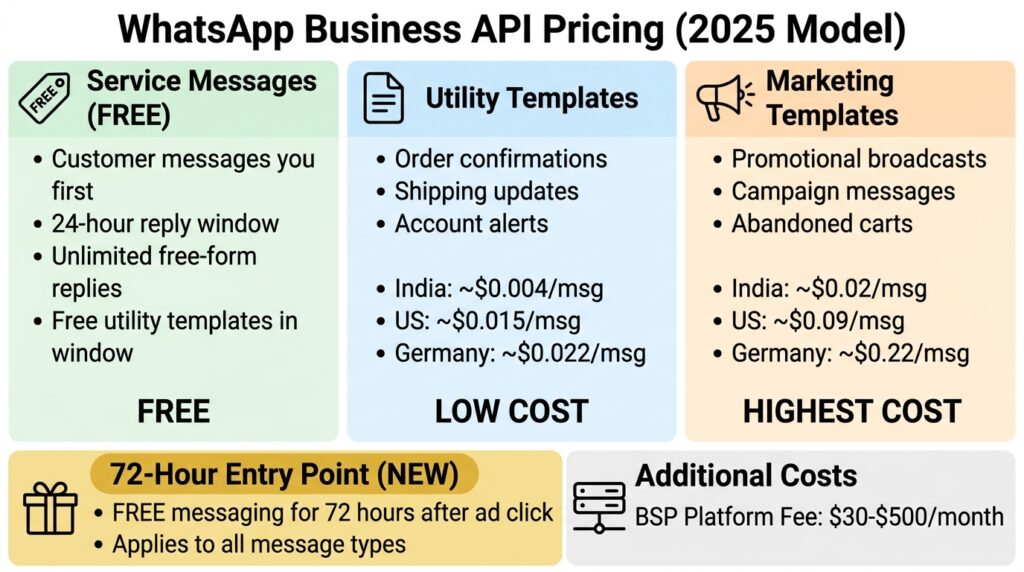
In July 2025, Meta switched to per-message pricing for business-initiated templates, making costs more granular and (ironically) more predictable once you understand the rules.
Here’s how the new pricing works:
When a customer messages you first, this opens a 24-hour customer service window to reply freely without paying for every message — as long as you’re using free-form text or utility message templates. Utility templates sent during this 24-hour window are completely free, but not marketing or authentication templates. This makes it easier and cheaper to handle support and order updates without worrying about rising costs.
Outside that window, you pay per template message, categorized as:
- Marketing messages (promotions, broadcasts): The most expensive tier.Marketing messages range from ~$0.02 (India) to $0.22 (Germany).
- Utility messages (order updates, shipping confirmations): Much cheaper. Utility and authentication messages are typically 50-95% cheaper, often under $0.01.
- Authentication messages (OTPs, verification): Also lower cost.
- Service messages: Customer service messages within 24-hour windows are free.
A bonus you should know about: A major update in July 2025 is the 72-hour entry window. When a customer engages with your brand through a Meta ad, a Facebook Call-to-Action, or another approved entry point, you can send any type of message—Marketing, Utility, or Authentication for free during the next 72 hours. This is designed to help businesses maximize ROI on advertising and improve onboarding flows.
On top of Meta’s fees, you’ll pay your BSP’s subscription (ranging from $30 to $500+ per month, depending on features and volume).
Bottom line: For businesses handling 200+ daily conversations, WhatsApp API typically delivers positive ROI within months. The 98% message open rate significantly outperforms email (20% open rate) and SMS.
How to Choose the Right WhatsApp Business API Provider for Your Online Store
Not all BSPs are created equal. Here’s what to look for:
- Ease of Setup — Can you go live in days, not weeks?
- No-Code Chatbot Builder — With platforms like AiSensy, you can build and deploy a WhatsApp ecommerce bot in under 10 minutes using a no-code flow builder.
- Native Ecommerce Integrations — Shopify, WooCommerce, Magento plugins that sync catalog, orders, and customer data.
- Automation Capabilities — Abandoned cart flows, broadcast segmentation, drip campaigns.
- Multi-Agent Inbox — Your support team needs a shared inbox where multiple agents can handle conversations simultaneously.
- Analytics & Reporting — Template performance, delivery rates, conversion tracking.
- Transparent Pricing — Beware of BSPs that add hidden markups on top of Meta’s fees.
Popular options include WATI, Interakt, AiSensy, Respond.io, Gallabox, Helo.ai, and larger platforms like Klaviyo, Braze, and ActiveCampaign that now offer integrated WhatsApp channels.
Best Practices for WhatsApp E-commerce Success
After analyzing what top-performing brands do differently, here are the practices that separate winners from the rest:
Get Explicit Opt-In — You need explicit customer opt-in and approved templates for business-initiated messages outside the service window. Never message someone who hasn’t agreed to hear from you.
Keep It Conversational — WhatsApp is a chat app, so steer clear of formal, robotic language. Aim for friendly, clear, and human above all else. Even automated messages should feel natural.
Respond Fast — Respond fast: use quick replies, automation, and clean agent handoff to keep resolution times low.
Keep Catalogs Updated — Keep catalogs accurate: maintain images, pricing, stock, and links so product messages convert.
A/B Test Everything — Monitor click rates and conversions to understand what’s resonating, and A/B test messages to compare formats, timing, and CTAs.
Personalize at Scale — Use CRM or CDP data to tailor offers and suppress irrelevant sends.
Respect Frequency — Sending too many messages is the fastest path to getting blocked and losing subscribers forever.
Common Mistakes to Avoid When Using WhatsApp for E-commerce
Let me save you some pain. Here are the mistakes I see brands make over and over:
Treating WhatsApp like email — Blasting the same message to your entire list without segmentation.
Ignoring the 24-hour window — You must respond within 24 hours. After that, the window closes, and you must use a paid template to reach the customer again. Wasted windows = wasted money.
Skipping compliance — Follow WhatsApp marketing rules (GDPR, Meta approval, opt-outs) to avoid bans and build long-term customer trust.
Not having a human fallback — Slow replies, dead-end chatbot paths, or unclear handoff to agents will frustrate customers. Always offer an “Speak to a human” option.
Poor catalog hygiene — Poor catalog hygiene and broken product links will tank your conversion rates instantly.
Skipping analytics — Skipping analytics, QA, and ongoing A/B testing means you’re flying blind.
Conclusion
WhatsApp for e-commerce isn’t a trend — it’s a fundamental shift in how online stores communicate with customers. With 3 billion monthly users, 98% open rates, and the ability to create end-to-end shopping experiences inside a single chat window, it’s arguably the most underutilized growth channel in ecommerce today.
Whether you start with simple automated order updates or go all-in with WhatsApp Flows, chatbots, and full-funnel marketing campaigns, the key is to start now. The brands that build their WhatsApp presence today will have an insurmountable advantage over those who wait.
The technology is mature, the tools are accessible, and the customers are already there — sitting in their WhatsApp inbox, waiting for your message. Don’t keep them waiting.
FAQs
Is WhatsApp for e-commerce free?
The WhatsApp Business App is free to download and use. However, the WhatsApp Business API (needed for automation, broadcasts, and scale) has costs — only service (session) messages sent as replies within the 24-hour customer service window are free of charge. Outside that window, you pay per template message, and you’ll also need a BSP subscription.
Can I use WhatsApp for e-commerce without coding?
Absolutely. With platforms like AiSensy, Helo ai you can build and deploy a WhatsApp ecommerce bot in under 10 minutes using a no-code flow builder. Most modern BSPs offer drag-and-drop interfaces for building automations, chatbots, and marketing campaigns.
What’s the difference between WhatsApp Business and WhatsApp Business API for e-commerce?
The WhatsApp Business app is a free-to-download tool that serves the needs of smaller e-commerce brands with maybe only a hundred customers or so. The API is designed for scale — automation, CRM integration, multi-agent inboxes, catalogs at scale, broadcasts, and analytics. If you’re serious about growth, you need the API.
How can WhatsApp help reduce cart abandonment for my online store?
WhatsApp cart recovery messages get read within minutes (not hours like email), enabling timely, personalized reminders. Companies using WhatsApp API report 70% cart recovery improvement and 25% drops in abandonment. Automated flows can send a series of timed reminders with product details, urgency triggers, and incentive offers — all inside the customer’s most-used messaging app.
What are WhatsApp Flows, and how can e-commerce brands use them?
WhatsApp Flows are native, in-app multi-step interactive experiences — like forms, quizzes, and guided journeys — that customers complete without leaving WhatsApp. E-commerce brands use them for size guide selectors, lead capture, custom order forms, address collection, CSAT surveys, and more. 6Catalogs, buttons, flows, and payments enable a seamless browse-to-buy journey. They’re one of the least competitive yet most powerful features available today.