WhatsApp Business Labels: Your Secret Weapon for Effortless Customer Management

Table of Contents
Did you know that businesses that use messaging apps for customer service report a 30% increase in customer satisfaction?. In today’s fast-paced digital world, connecting with your customers on their preferred platforms is no longer a luxury; it’s a necessity. And when it comes to messaging, WhatsApp stands out as a global giant, boasting over 2 billion users worldwide. For businesses, leveraging this massive user base through the WhatsApp Business Platform opens up a universe of opportunities for engagement, support, and sales.
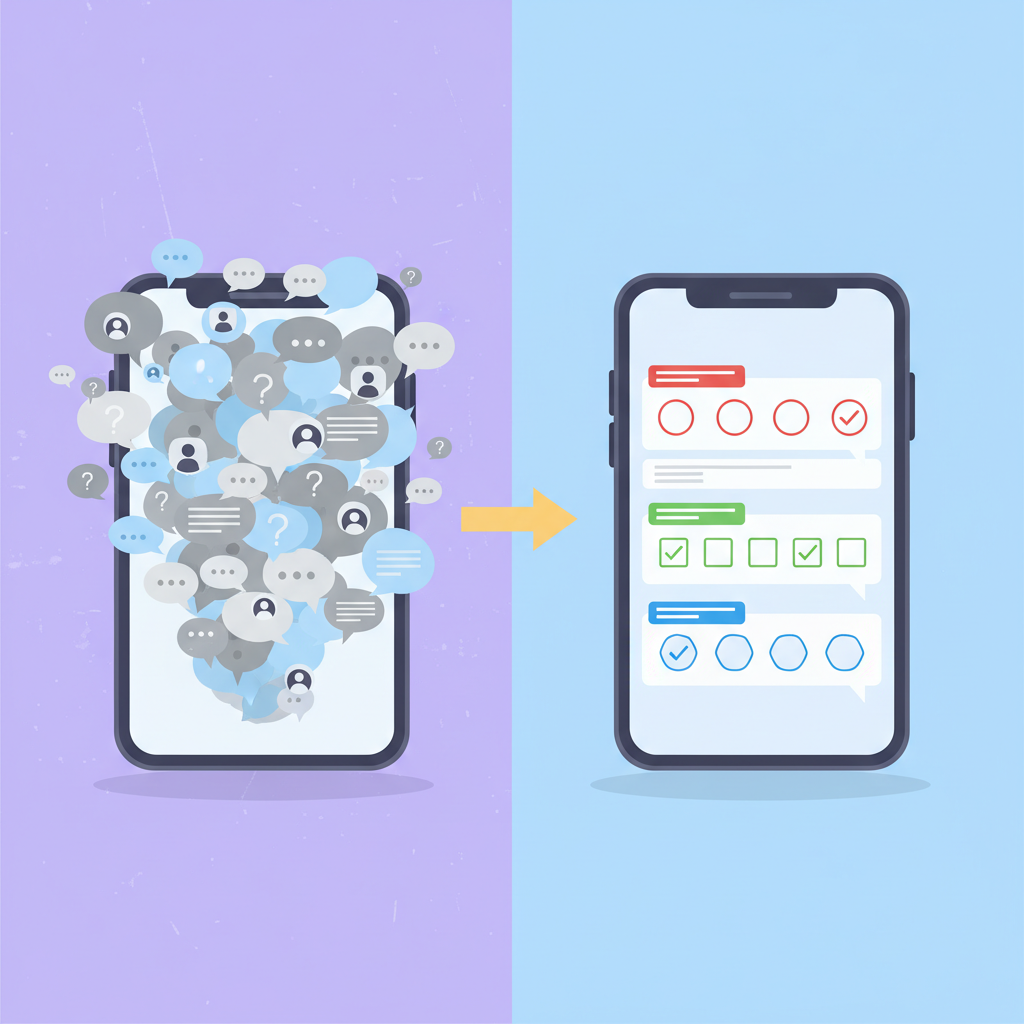
But managing a growing list of customer conversations can quickly become overwhelming. Imagine juggling hundreds, or even thousands, of chats – how do you keep track of who needs what, who’s a new lead, who’s a loyal customer, and who’s awaiting a specific update? This is precisely where WhatsApp Business Labels come into play. They are your digital filing system, your organizational superpower, transforming chaotic chat lists into streamlined, actionable workflows.
Think of labels as customizable tags you can assign to your conversations. Instead of relying on memory or endless scrolling, you can instantly categorize chats based on customer status, order progress, inquiry type, or any other criteria that make sense for your business. This isn’t just about tidiness; it’s about efficiency, personalization, and ultimately, better customer relationships.
In this comprehensive guide, we’re going to dive deep into the world of WhatsApp Business Labels. We’ll explore what they are, why they are an indispensable tool for businesses of all sizes, how to create and use them effectively, and how they integrate with the broader WhatsApp Business API ecosystem. Whether you’re a small business owner just starting out or a larger enterprise looking to optimize customer communication and understanding, using WhatsApp Business Labels will be a game-changer. Let’s unlock the power of organized conversations and elevate your customer experience to new heights.
Understanding WhatsApp Business Labels: More Than Just Stickers
At its core, a WhatsApp Business Label is a simple yet powerful feature designed to help you organize and manage your customer conversations within the WhatsApp Business app or the WhatsApp Business API. Think of them like sticky notes or color-coded folders that you can attach to individual chats or groups of chats. They let you quickly identify the status or nature of a conversation without opening each one.
The WhatsApp Business Platform offers two main ways to use WhatsApp for business: the WhatsApp Business App (ideal for small businesses with a single user or a small team) and the WhatsApp Business API (designed for medium to large businesses needing to scale their communication across multiple agents and systems). Labels are a fundamental feature available in both, though their implementation and advanced usage might differ slightly, especially when integrated with CRM systems via the API.
What Can Labels Represent?
The beauty of labels lies in their flexibility. You can define what each label means for your business. Here are some common examples:
- Customer Status:
- New Customer: For potential leads or first-time buyers.
- Existing Customer: For those who have purchased before.
- VIP Customer: For your most loyal and high-value clients.
- Inactive Customer: For those who haven’t interacted in a while.
- Order Management:
- New Order: For recently placed orders awaiting processing.
- Payment Pending: For orders where payment confirmation is needed.
- Order Shipped: For orders that have left your facility.
- Delivered: For orders successfully received by the customer.
- Return/Exchange: For customers initiating a return or exchange process.
- Inquiry Type:
- Product Inquiry: Questions about specific products or services.
- Support Request: Technical issues or troubleshooting needs.
- Feedback: Customers sharing their opinions or suggestions.
- Complaint: Customers expressing dissatisfaction.
- Follow-up Needed:
- Follow-up Required: For chats where you need to get back to the customer later.
- Quote Sent: For inquiries where you’ve provided a price estimate.
- Appointment Booked: For service-based businesses scheduling appointments.
The possibilities are truly endless, limited only by your creativity and business needs. By assigning relevant labels, you create a visual shorthand that allows you and your team to understand the context of a conversation at a glance.
The Difference Between the App and the API
While the concept of labels is the same, the way you interact with them can differ:
- WhatsApp Business App: You can manually create, assign, and manage labels directly within the app interface on your smartphone. It’s straightforward and designed for individual or small team use. You can view chats by label, making it easy to filter and prioritize.
- WhatsApp Business API: When using the API, labels can be managed programmatically. This means you can integrate label management with your existing CRM, helpdesk software, or other business tools. For instance, when a new lead comes in through your website and initiates a chat via WhatsApp, your system can automatically assign a “New Lead” label. Similarly, as an order progresses through your internal systems, the corresponding WhatsApp chat can be automatically updated with labels like “Payment Confirmed” or “Shipped.” This automation is crucial for scaling operations and ensuring consistent data across platforms. Exploring the WhatsApp Business API is key to unlocking these advanced capabilities.
Why WhatsApp Business Labels Are a Must-Have Tool
You might be thinking, “Can’t I just remember who’s who?” While that might work for a handful of chats, it quickly breaks down as your business grows. Relying solely on memory or manual note-taking is inefficient, error-prone, and hinders scalability. WhatsApp Business Labels offer a structured solution that brings tangible benefits:
1. Enhanced Organization and Efficiency
This is the most immediate and obvious benefit. Instead of a long, undifferentiated list of chats, you see a categorized view.
- Quick Prioritization: See at a glance which chats require urgent attention (e.g., “Payment Pending,” “Support Request”).
- Reduced Cognitive Load: No need to remember the details of every conversation. The label provides instant context.
- Streamlined Team Collaboration: If you have multiple team members using the WhatsApp Business account (especially with the API), labels ensure everyone is on the same page regarding customer status. A shared understanding of labels prevents duplicate efforts or missed follow-ups.
2. Improved Customer Service and Personalization
Labels enable you to move beyond generic responses and offer a more tailored experience.
- Faster Response Times: Quickly locate chats relevant to specific departments or agents (e.g., all “Support Requests” go to the support team).
- Personalized Communication: Address customers based on their history or status. A VIP customer might receive a slightly different tone or offer than a new lead.
- Proactive Engagement: Easily identify customers who might need a follow-up or who haven’t been contacted recently, allowing for proactive outreach. For example, you could filter for “Inactive Customers” and send them a special offer.
3. Streamlined Sales and Lead Management
For sales teams, labels are invaluable for tracking potential customers through the sales funnel.
- Lead Qualification: Label chats as “Hot Lead,” “Warm Lead,” or “Cold Lead” based on interaction level.
- Funnel Visibility: Track how many prospects are in each stage of your sales process directly within WhatsApp.
- Targeted Follow-ups: Schedule and execute follow-ups more effectively based on the assigned lead status.
4. Data Insights and Reporting (Especially with API)
While the basic app provides organizational benefits, integrating labels with the WhatsApp Business API and your CRM unlocks powerful data insights.
- Track Conversation Types: Understand the volume of different inquiry types (support vs. sales vs. feedback).
- Monitor Customer Journey: Analyze how customers move through different stages (e.g., from “New Lead” to “Order Shipped”).
- Identify Bottlenecks: Spot where conversations tend to get stuck (e.g., a high number of “Payment Pending” chats might indicate an issue with your payment process).
- Performance Metrics: Measure response times and resolution rates for different types of inquiries or customer segments.
5. Seamless Integration with E-commerce (Crucial for Online Stores)
For businesses selling online, WhatsApp is becoming a critical touchpoint. Labels help manage this flow. Think about the entire customer journey on platforms like Shopify or WooCommerce. You can use labels to mirror these stages within WhatsApp.
- Order Confirmation: Automatically label chats when an order is placed.
- Shipping Updates: Update labels as the order is processed and shipped.
- Post-Purchase Follow-up: Label chats for feedback requests or warranty information.
- Cart Abandonment: Potentially use labels to identify and re-engage users who dropped off. This is a key area where WhatsApp for Ecommerce shines. Learn more about Whatsapp For Ecommerce.
6. Compliance and Audit Trails (API)
When using the WhatsApp Business API, structured data, including labels, can contribute to better compliance and provide audit trails for customer interactions, which is vital for regulated industries. Ensuring you understand Whatsapp Api Compliance is paramount.
In essence, WhatsApp Business Labels transform a potentially chaotic communication channel into a well-organized, efficient, and insightful tool. They are the unsung heroes of effective customer relationship management on WhatsApp.
Getting Started: Creating and Using Labels in the WhatsApp Business App
The WhatsApp Business App is incredibly user-friendly, and setting up labels is a breeze. Here’s how you do it:
Creating New Labels
- Open WhatsApp Business: Launch the app on your smartphone.
- Navigate to Settings:
- On Android: Tap the three vertical dots (⋮) in the top right corner, then select “Settings.”
- On iOS: Tap “Settings” in the bottom right corner.
- Select “Business Tools”: You’ll find this option in the Settings menu.
- Tap “Labels”: This will take you to the Labels screen.
- Tap “New Label”: You’ll see a list of default labels (like “New customer,” “New order,” “Pending payment,” “Pending reply”) and an option to create your own.
- Enter Label Name: Type in the name for your new label (e.g., “Product Demo Request,” “Urgent Support”).
- Choose a Color (Optional but Recommended): Assigning a unique color to each label makes them visually distinct and easier to scan.
- Tap “Save”: Your new custom label is now ready to use!
You can create up to 20 different labels for your business. It’s a good idea to plan your labels in advance, thinking about the key categories that matter most to your workflow.
Assigning Labels to Chats
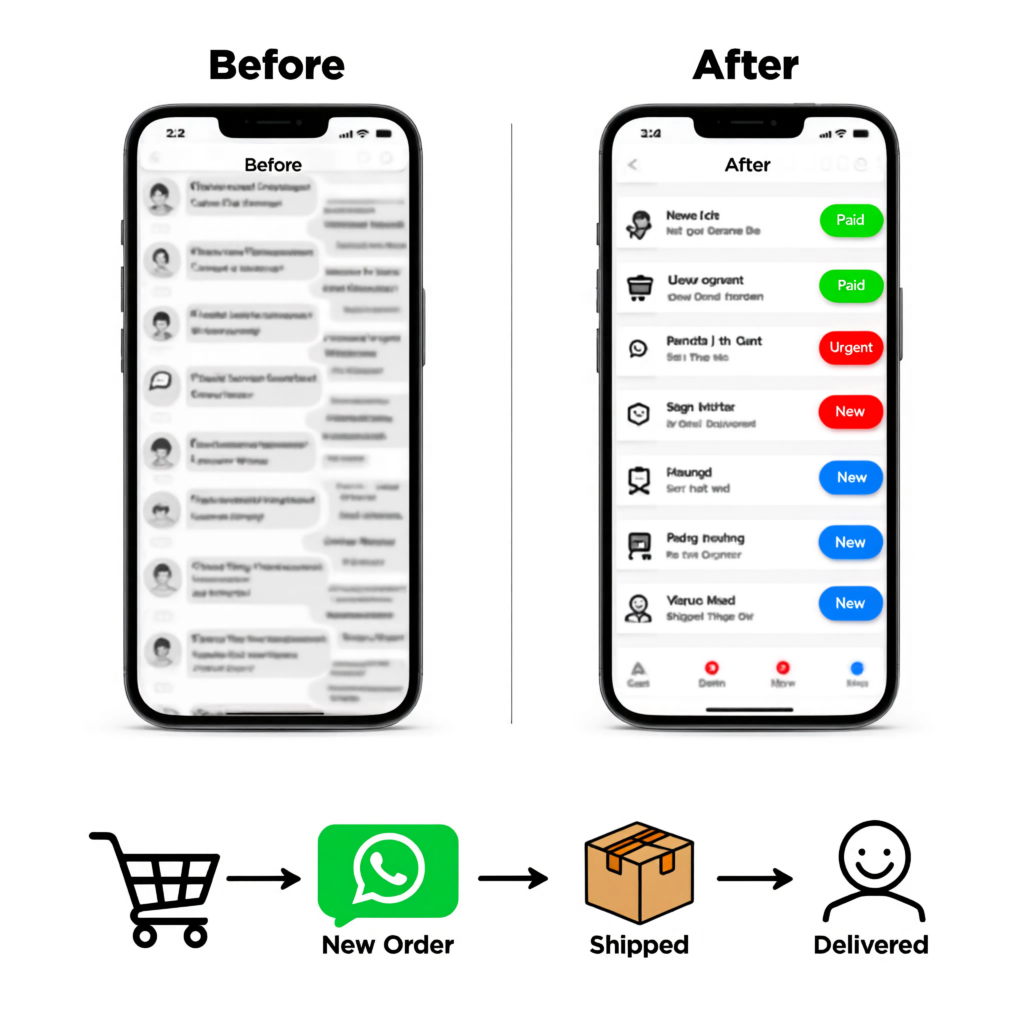
Once you have your labels set up, assigning them is simple:
Method 1: From the Chats List
- Long-press on the chat you want to label in your main Chats list.
- Tap the label icon (it looks like a price tag) that appears at the top of the screen.
- Select the label(s) you want to apply to that conversation by tapping on them. A checkmark will appear next to selected labels.
- Tap “Save” or the back arrow.
Method 2: Inside a Chat
- Open the specific chat you want to label.
- Tap the contact’s name or group name at the top to open the contact info or group info screen.
- Tap “Labels”.
- Select the label(s) you want to apply.
- Tap “Save” or the back arrow.
You can assign multiple labels to a single chat if it fits into more than one category (e.g., a chat could be both “New Customer” and “Product Inquiry”).
Viewing Chats by Label
This is where the organizational power truly shines:
- Open WhatsApp Business.
- Tap the three vertical dots (⋮) in the top right corner (Android) or navigate to “Business Tools” > “Labels” (iOS).
- Tap “Labels”.
- You’ll see a list of all your labels, along with the number of chats assigned to each.
- Tap on any label name to see only the conversations that have that specific label applied.
This filtering capability allows you to quickly focus on specific groups of customers or tasks. For example, tapping “Order Shipped” shows you all conversations where you’ve indicated that status, making it easy to check if any customers have follow-up questions.
Editing and Deleting Labels
Need to change a label name or color, or remove one entirely?
- Go to Settings > Business Tools > Labels.
- Tap the three vertical dots (⋮) next to the label you want to edit or delete.
- Select “Edit label” to change its name or color.
- Select “Delete label” to remove it. Note: Deleting a label will remove it from all chats it was applied to.
Advanced Label Management: The Power of the WhatsApp Business API
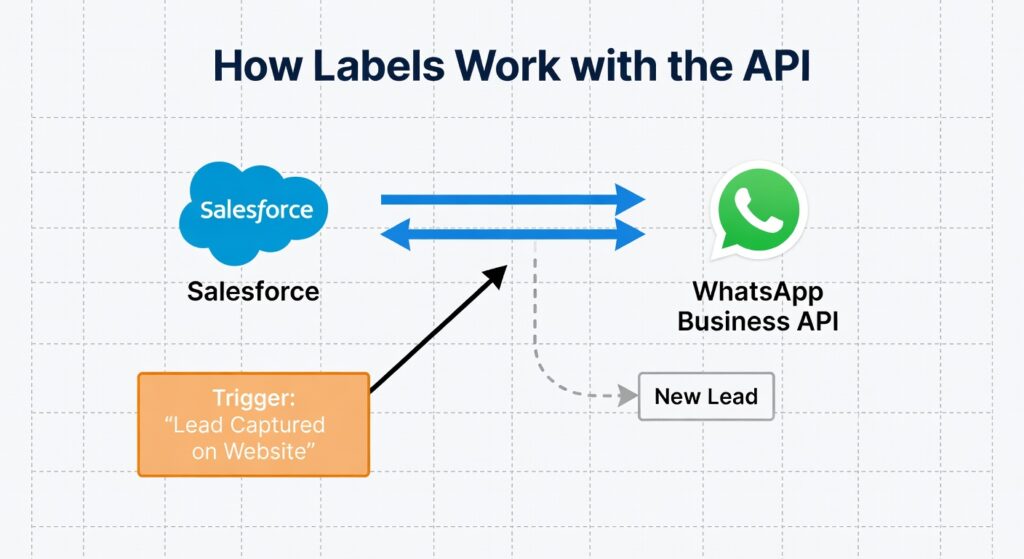
While the WhatsApp Business App is perfect for smaller operations, the WhatsApp Business API takes label management to an enterprise level, enabling automation and integration with your existing business infrastructure.
How Labels Work with the API
When you use the API, you interact with WhatsApp through specific programming interfaces (APIs). This allows your developers or integrated software (like a CRM or helpdesk) to:
- Programmatically Assign Labels: Based on triggers within your systems, labels can be automatically applied to conversations.
- Example: A customer fills out a “Contact Us” form on your website, and the data is sent to your CRM. Your CRM then initiates a WhatsApp chat via the API and automatically applies the “New Lead” label.
- Programmatically Remove Labels: As a customer’s status changes (e.g., their order is delivered), the corresponding label can be removed or updated.
- Retrieve Chats by Label: Your systems can query WhatsApp to fetch all conversations associated with a particular label, facilitating targeted campaigns or support efforts.
- Integrate with CRM/Helpdesk: This is the most powerful application. Labels in WhatsApp can be synchronized with fields or tags in your CRM (like Salesforce, Zoho, HubSpot) or helpdesk software (like Zendesk). This creates a unified view of the customer across all touchpoints.
Benefits of API-Driven Label Management
- Scalability: Handle thousands of conversations without manual intervention. Automation is key to scaling efficiently. For businesses needing to send bulk messages safely, exploring options like 1000 Messages Whatsapp Business Api Bulk Safe can be beneficial, and labels help manage these interactions.
- Consistency: Ensures that labels are applied uniformly across all conversations, regardless of which agent is handling them.
- Automation: Reduces manual workload, freeing up agents to focus on complex customer issues rather than administrative tasks.
- Data Accuracy: Reduces human error in assigning or tracking labels.
- Unified Customer View: Integrates WhatsApp interactions seamlessly into your broader customer data ecosystem.
Finding the Right API Provider
Implementing the WhatsApp Business API requires working with a Business Solution Provider (BSP). These partners help businesses connect to the API and often provide additional tools and support. When choosing a provider, consider:
- Features: Do they offer robust label management and automation capabilities?
- Integration: Can they help integrate with your existing CRM or other software?
- Pricing: Understand the Whatsapp Api Pricing In India and other regions. Pricing models vary based on message volume, features, and the provider.
- Support: What level of technical support do they offer?
- Compliance: Ensure they adhere to all WhatsApp Business Platform policies.
Many providers offer solutions tailored to different business sizes. Searching for the Best Whatsapp Business Api Providers India Small Businesses can help you find partners experienced with your specific needs.
Best Practices for Using WhatsApp Business Labels Effectively
Simply creating labels isn’t enough; using them strategically is what unlocks their true potential. Here are some best practices:
- Keep it Simple and Consistent:
- Don’t create too many labels initially. Start with the most essential ones and add more as needed.
- Use clear, concise, and intuitive names. Avoid jargon.
- Ensure your entire team understands what each label means and uses them consistently. Develop a team guideline document if necessary.
- Plan Your Label System:
- Before creating labels, map out your key customer journey stages, common inquiry types, and important customer segments.
- Consider how labels can support your sales, marketing, and support workflows.
- Leverage Colors:
- Assign distinct colors to labels to make your chat list visually scannable. Use a consistent color scheme (e.g., green for positive statuses like “Order Shipped,” red for urgent issues like “Complaint”).
- Use Multiple Labels Strategically:
- Don’t hesitate to apply multiple labels to a chat if it accurately describes the situation. For example, a chat could be “New Customer” and “Product Inquiry.”
- However, avoid over-labeling, which can defeat the purpose of simplicity.
- Regularly Review and Refine:
- Periodically review your labels. Are they still relevant? Are there new categories you need?
- Are your team members using them correctly? Provide training or refreshers as needed.
- For API users, regularly analyze the data derived from labels to identify trends and areas for improvement.
- Integrate with Other Tools (API):
- If you’re using the API, prioritize integration with your CRM or helpdesk. This creates a single source of truth for customer information.
- Automate label assignment and removal based on actions in your other systems.
- Train Your Team:
- Ensure all team members who use WhatsApp Business understand the labeling system, its importance, and how to use it correctly.
- Onboarding new team members should include training on the labeling protocol.
- Use Labels for Proactive Communication:
- Filter chats by labels like “Inactive Customer” or “Needs Follow-up” to proactively reach out and re-engage.
- Identify “VIP Customers” and offer them exclusive support or perks.
- Combine with Quick Replies:
- Labels can help you quickly identify the context of a conversation, allowing you to use relevant Quick Replies more efficiently. For example, if you filter by “Support Request,” you can quickly access pre-written replies for common technical issues.
By following these best practices, you can transform WhatsApp Business Labels from a simple organizational feature into a strategic asset for managing customer relationships, driving sales, and improving operational efficiency.
Real-World Examples: Labels in Action
Let’s see how different types of businesses can use WhatsApp Business Labels:
E-commerce Store
- Labels:
New Order(Color: Blue) – Automatically assigned when an order is placed.Payment Confirmed(Color: Green) – Assigned once payment is verified.Processing Order(Color: Yellow) – When the warehouse is preparing the shipment.Shipped(Color: Teal) – When tracking information is available.Delivery Query(Color: Orange) – Customer asking about delivery status.Return Request(Color: Red) – Customer wants to return an item.Product Inquiry(Color: Purple) – Pre-purchase question.Feedback Received(Color: Grey) – Post-purchase feedback.
- Workflow: A customer messages about a product (
Product Inquiry). After purchase, the order is automatically taggedNew OrderandPayment Confirmed. As it ships, the label changes toShipped. If the customer messages again about delivery, the agent sees theShippedlabel and can quickly access tracking info. If aReturn Requestcomes in, it’s flagged for immediate attention by the returns team.
Service Business (e.g., Salon, Mechanic)
- Labels:
New Booking Request(Color: Blue)Appointment Confirmed(Color: Green)Reminder Needed(Color: Yellow) – For follow-up reminders before the appointment.Service Completed(Color: Teal)Follow-up Needed(Color: Orange) – For post-service check-ins or feedback requests.Cancellation(Color: Red)Reschedule Request(Color: Purple)
- Workflow: A client messages to book an appointment (
New Booking Request). Once confirmed, the label changes toAppointment Confirmed. A day before, a reminder is sent, and the label might be updated toReminder Neededor simply kept asAppointment Confirmed. After the service, it becomesService Completed, and perhaps later, a follow-up message is sent, tagging itFollow-up Needed.
SaaS Company
- Labels:
New Trial Signup(Color: Blue)Onboarding Assistance(Color: Yellow)Technical Support(Color: Red)Feature Request(Color: Purple)Billing Inquiry(Color: Orange)Customer Success Call Scheduled(Color: Green)Churn Risk(Color: Dark Red) – Identified through specific interactions.
- Workflow: A user signs up for a trial (
New Trial Signup) and asks for help (Onboarding Assistance). If they encounter a bug, it’s taggedTechnical Support. If they suggest a new feature, it’sFeature Request. A customer success manager can easily filter forCustomer Success Call Scheduledto prepare for their meetings or identifyChurn Riskaccounts for proactive intervention.
Small Local Business (e.g., Restaurant)
- Labels:
Reservation Inquiry(Color: Blue)Order for Pickup(Color: Yellow)Order for Delivery(Color: Teal)Table Reserved(Color: Green)Order Ready(Color: Orange)Feedback(Color: Grey)
- Workflow: Someone calls to reserve a table (
Reservation Inquiry), which is then confirmed (Table Reserved). Another customer orders food for pickup (Order for Pickup), which is updated toOrder Readywhen prepared. This simple system helps manage different types of incoming requests efficiently.
These examples illustrate how adaptable labels are. By defining a clear labeling strategy that aligns with your business processes, you can significantly improve how you manage customer interactions on WhatsApp. Remember, the goal is to make information easily accessible and actionable for you and your team. For businesses looking to scale their WhatsApp communication significantly, understanding the capabilities of the WhatsApp Business Api is crucial.
Frequently Asked Questions (FAQs)
What exactly are WhatsApp Business Labels?
WhatsApp Business Labels are customizable tags you can assign to individual chats or group chats within the WhatsApp Business app or via the WhatsApp Business API. They function like digital sticky notes, allowing you to categorize conversations based on customer status, order progress, inquiry type, or any other criteria relevant to your business operations. This helps in organizing, prioritizing, and managing customer interactions more efficiently.
How many labels can I create in WhatsApp Business?
In the WhatsApp Business app, you can create up to 20 distinct labels for your business. These can be a mix of the default labels provided by WhatsApp and your own custom-created labels.
Can I assign multiple labels to a single chat?
Yes, absolutely! A single chat can have multiple labels assigned to it if it falls into more than one category. For example, a conversation could be tagged as both “New Customer” and “Product Inquiry,” providing a richer context for your team.
How do I view chats filtered by a specific label?
To view chats by label, open WhatsApp Business, navigate to “Business Tools” (or tap the three dots menu on Android), select “Labels,” and then tap on the specific label name you wish to view. This will display only the conversations that have that particular label applied.
Are labels available on both the WhatsApp Business App and the WhatsApp Business API?
Yes, labels are a core feature available on both the WhatsApp Business App (for individual users and small teams) and the WhatsApp Business API (for larger businesses needing automation and integration). While the concept is the same, the management and automation capabilities are significantly more advanced with the API, allowing integration with CRM and other business systems.
What happens if I delete a label?
If you delete a label, it will be removed from all chats it was previously assigned to. The label itself will also be removed from your list of available labels. It’s a permanent action, so ensure you no longer need the label before deleting it.
Can labels be automated with the WhatsApp Business API?
Yes, automation is one of the key advantages of using the WhatsApp Business API. Labels can be programmatically assigned, removed, or updated based on triggers within your business systems (like a CRM or order management software). This allows for highly efficient and scalable customer management without manual intervention. Understanding Whatsapp Api Compliance is essential when setting up such automated systems.
Key Takeaways
- Organization is Key: WhatsApp Business Labels are powerful tools for categorizing and organizing customer conversations, transforming a messy chat list into a structured workflow.
- Flexibility: Labels can represent anything from customer status (New, VIP) and order progress (Shipped, Pending) to inquiry types (Support, Sales).
- Efficiency Boost: Quickly identify, prioritize, and manage chats, leading to faster response times and improved team collaboration.
- Personalization: Understand customer context at a glance, enabling more personalized and effective communication.
- App vs. API: Labels are available on both the WhatsApp Business App (manual use) and the WhatsApp Business API (enabling automation and CRM integration).
- Scalability: For larger businesses, API integration allows for automated label management, crucial for handling high volumes of conversations. Explore options like the Whatsapp Business Api for scaling.
- Best Practices: Plan your labels, use colors effectively, maintain consistency, train your team, and consider integration with other business tools for maximum impact.
- E-commerce Integration: Labels are vital for managing the customer journey in e-commerce, mirroring order statuses and communication needs. This is a core benefit of Whatsapp For Ecommerce.
- Strategic Asset: When used effectively, labels move beyond simple organization to become a strategic asset for improving customer service, driving sales, and gaining insights. Consider providers that offer robust solutions, such as those found when looking for Best Whatsapp Business Api Providers India Small Businesses.
Conclusion
In the digital landscape of customer engagement, clarity and efficiency are paramount. WhatsApp Business Labels provide a simple yet incredibly effective mechanism to achieve both. Whether you’re a solopreneur managing a few dozen chats or a large enterprise orchestrating thousands, the ability to instantly categorize and understand the context of every conversation is invaluable.
By implementing a thoughtful labeling strategy, you empower yourself and your team to respond faster, communicate more personally, and manage workflows with unprecedented ease. They are the silent organizers, working behind the scenes to ensure no customer query slips through the cracks and that every interaction moves your business forward.
Don’t underestimate the power of these digital tags. Embrace WhatsApp Business Labels, integrate them into your daily operations, and witness the transformation in your customer management, satisfaction, and overall business efficiency. It’s time to move beyond the chaos of an unmanaged inbox and step into the world of organized, intelligent customer communication on WhatsApp.